 StreamLive Pro
You have used all Shorts": the Shorts limit is reached
A message says your Shorts are used up? What the monthly and trial Shorts limits are, when they renew, why fewer Shorts came out, and what to do now.
When the message says you have used all the Shorts, the cause is almost always the allowance itself: every Short made in the current billing month counts, automatic ones after a live and ones you made by hand, and the month's number is used up. In the 7-day trial the allowance is for the whole trial, not per month, and one video gives at most 5 Shorts. Nothing is broken. The Shorts come back on your renewal date, or at once on a higher plan.
The messages and what they mean
| Message you see | What it means | What to do |
|---|---|---|
| "You have used all ... shorts of this billing month. They renew on ..." | The monthly Shorts of your plan are used | Wait for the date shown, or see /pricing?lang=en |
| "You have used all ... shorts included in the trial. Choose a plan to make more." | The trial's Shorts are used | Choose a plan; the trial does not renew |
| "Shorts were not started: the trial includes 5 shorts per video" | In the trial, this video already gave its 5 | Use another video |
| In Settings: "This month's Shorts are used up. They renew on ..." | The same monthly limit, shown before you go live | Plan the next lives, or turn automatic Shorts off until then |
| You asked for 5 and got 2 | Only 2 were left this month | Expected: you get as many as are left |
| "No more Shorts in this video" | Not a limit: the video gave all it could | Try a different video |
Steps
- See what is left. Open Shorts. The page and the Create Shorts window show how many Shorts are left. In Settings, under "Shorts from every live", the same line shows the renewal date when they are used up.
- Check the period. The month follows your billing date, not the calendar. A plan bought on the 12th renews its Shorts on the 12th.
- Look for Shorts you did not need. Test broadcasts also make Shorts. In the Shorts page, every folder is one job; a test live that made 5 Shorts used 5.
- Stop the leak until renewal. Turn automatic Shorts off (Turn automatic Shorts on or off) and ask for Shorts by hand only from the broadcasts that matter.
- Lower the number per live. Set "Shorts from every live" to 1, 2 or 3 so the next month lasts longer: How many Shorts can I make?.
- Or move to a higher plan. Pro has more Shorts than Creator, and Studio more than Pro. The numbers are on /pricing?lang=en. After the change you can make Shorts again at once.
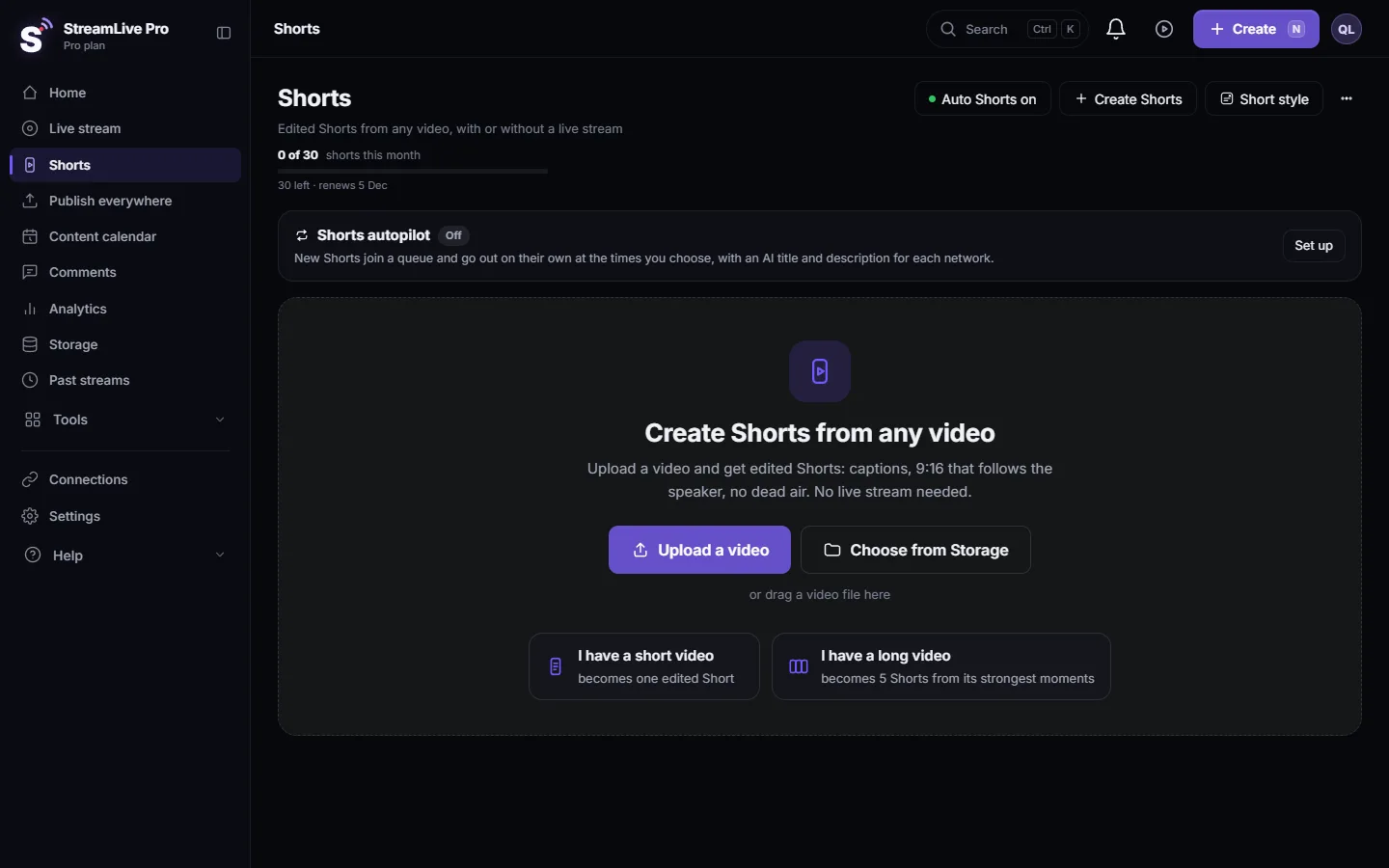
How the count works
- A job reserves its Shorts from the allowance when it starts. If it makes fewer, for example because the video had fewer good moments, the unused ones go back.
- Pressing Create again on the same video makes Shorts from other parts of it, and those count again.
- Deleting a Short does not give it back. The count is of Shorts made, not Shorts kept.
- Uploading Shorts to YouTube is counted separately, per day: The daily limit on YouTube uploads.
- If a paid plan ends and is not renewed, the account loses its Shorts a short time after the end date. There is no free plan to fall back on.
When to contact support
Write to [email protected] if the page says no Shorts are left but you made far fewer than your plan's number this billing month, or the renewal date passed and the limit did not reset. Send the account e-mail, your plan, the renewal date you see, and a screenshot of the Shorts page and of the message.
Related: Shorts were not created after my live stream, When you reach a limit: what the message means, My trial ended: what happens to my account and files.
Frequently asked questions
When do my Shorts renew?
On your billing date each month, not on the first of the month. Settings shows the exact date once the Shorts are used up.
Do Shorts I deleted come back to my allowance?
No. Every Short that was made counts, even if you delete it later.
Can I buy extra Shorts without changing my plan?
The pricing page shows the plans and what each includes. A higher plan gives more Shorts at once.
Why did I get fewer Shorts than I asked for?
Fewer were left in the allowance than you chose, so you got as many as were left. Or the video had fewer good moments.
Does the trial renew its Shorts?
No. The trial's Shorts are for the whole 7 days. After them, a plan is needed.
Keep reading
Storage full in StreamLive Pro? What uses the space, what stops working, which files to delete first, and how to keep a recording from being cut short.
My video upload failedVideo upload failed in StreamLive Pro? The file may be over 6 GB, bigger than your free storage, or the upload was cut off. What each message means and the fix.
My YouTube upload is waiting in a queueYour YouTube upload says it is queued? Why it waits for midnight Pacific time, how to check when it starts, and what to do when it cannot wait.
Shorts are taking long or "Creating shorts is stuckShorts still processing? What each step on the Creating shorts card means, how long a set takes, when it counts as stuck, and what to do next.
Want to try it? 7-day trial, no credit card.
Start free