 StreamLive Pro
Shorts were not created after my live stream
Shorts were not created after your live? Check the automatic Shorts setting, your monthly Shorts, the length of the live and how to make them by hand.
The most likely cause: automatic Shorts are switched off in your settings, or the month's Shorts are used up. Automatic Shorts are on by default and run when a broadcast ends, unless someone set them to Off. Each video gives up to 5 Shorts, and every Short counts toward the monthly number in your plan. If neither is the cause, the Shorts may still be processing (a set of five can take about twenty minutes), or the broadcast had too little speech to cut from. In most cases you can still ask for Shorts by hand, as long as the broadcast's video still exists.
Symptom, cause and fix
| Symptom | Likely cause | Fix |
|---|---|---|
| No folder for the broadcast on the Shorts page | Automatic Shorts set to Off | Settings, the automatic Shorts card: choose an On mode. For this broadcast, ask by hand (steps 4-5) |
| A message that all the month's Shorts are used | The monthly Shorts in your plan are used up | Wait for the next billing month, or see /pricing?lang=en |
| The folder is there but still empty | Still processing | Wait. A few minutes per Short, about twenty minutes for five |
| A message that no part of the video could be turned into a clip | The broadcast was very short, mostly silent, or the recording could not be read | Use a longer video with continuous speech |
| On the trial, a message about Shorts per video | The trial caps Shorts per video and in total | See Plans, billing and limits |
| Generate Shorts is missing from the broadcast menu | The video was already removed, about two hours after the end, because it was not kept | Shorts cannot be made from it any more. Keep the next one: Where is my live stream recording? |
| A message that the usage check is temporarily unavailable | A short problem on our side | Try again in a few minutes |
Steps
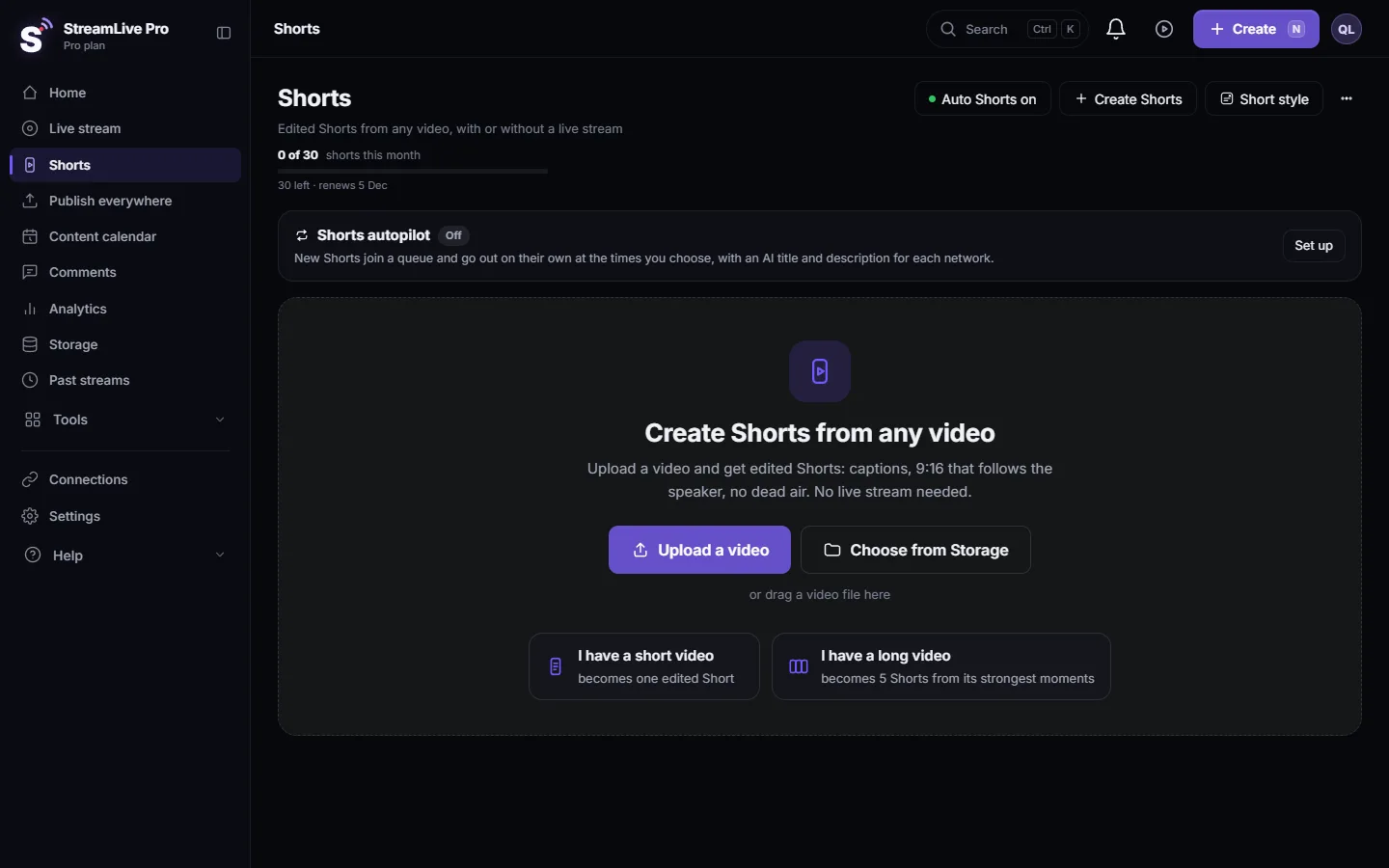
- Open the Shorts page. Choose Shorts. Every broadcast or video that produced Shorts has its own folder. Progress shows here while Shorts are being made.
- Check the automatic setting. Open Settings and find the card "Auto-generate Shorts after every stream / recording". Generation mode must not be "Off". The Autopilot button at the top of the Shorts page shows the same state and switches it with one click.
- Check the count. The Shorts page and the create window show how many Shorts are left this month.
- Ask by hand from the broadcast. Open Past streams, click the three dots on the broadcast card and choose Generate Shorts. A request by hand runs even when the automatic mode is Off; it passes the same plan checks.
- Or start from Create Shorts. On the Shorts page press Create Shorts, pick the recording from Storage and choose Several Shorts. Details: How to create Shorts from any video, no live stream needed.
- Wait for the folder. You can close the window and keep working. When the Shorts are ready, review each one before publishing; the moments are picked automatically and can miss.
What decides how many Shorts you get
Each broadcast or video gives at most 5 Shorts. How they are chosen depends on the plan. On Creator and the trial, candidate moments come from the pauses in speech. On Pro and Studio, the AI mode listens to the whole recording and polishes each Short. Both can choose a weak moment, so watch them before you publish. Each Short is cut 9:16, follows the speaker and gets burned-in captions; the trial adds a small watermark.
Pressing again on the same video gives Shorts from other parts of it, not the same ones. When a video has given everything it can, the message says so; pressing again will not help, try another video.
The recording question
Automatic Shorts are made within minutes of the end, from the temporary copy of the broadcast. That copy is removed about two hours after the end unless you pressed Record or kept it. So if automatic Shorts were off and more than two hours have passed, there is nothing left to cut from. To avoid this, press Record during the live, or keep the broadcast from its menu in Past streams soon after it ends. More: Recordings and storage — what is kept and for how long.
When to contact support
Write to [email protected] if automatic Shorts are on, you have Shorts left this month, the broadcast was longer than a few minutes with speech, and an hour later the Shorts page still shows nothing. Send the broadcast title, the date and time, your plan, and a screenshot of the Shorts page and of any message you saw.
Related: How to make Shorts from a live stream automatically, Edit a Short before you publish it, Publish all your Shorts at once.
Frequently asked questions
Are automatic Shorts on by default?
Yes. They run after every broadcast unless the setting was changed to Off. You can check it in Settings or with the Autopilot button on the Shorts page.
How many Shorts does one live give?
Up to 5. Every Short counts toward the monthly number in your plan, shown on the pricing page.
Can I get Shorts if automatic Shorts were off?
Yes, if the broadcast's video still exists. Open Past streams, click the three dots on the card and choose Generate Shorts, or use Create Shorts on the Shorts page.
How long should I wait before assuming something is wrong?
A few minutes per Short. A set of five from a long broadcast takes about twenty minutes. After an hour with nothing, contact support.
Why did a short broadcast give no Shorts?
A Short needs a moment that stands on its own. A very short or mostly silent broadcast may have none, and the Shorts page then says no part of the video could be turned into a clip.
Keep reading
Storage full in StreamLive Pro? What uses the space, what stops working, which files to delete first, and how to keep a recording from being cut short.
Trial has ended and other trial messages explainedWhat the trial messages in StreamLive Pro mean: the 7-day trial has ended, the trial's lives are used up, or a subscription ended. What still works and what to do.
Turn automatic Shorts on or offTurn automatic Shorts on or off in StreamLive Pro: the Autopilot button, the Settings card, a count for one live, and how to still make Shorts by hand when off.
StreamLive Pro app: questions and answersAnswers about the StreamLive Pro app: App Store and Google Play status, the Android download, iPhone, iPad, going live, Shorts, capture cards and the account.
Want to try it? 7-day trial, no credit card.
Start free