 StreamLive Pro
My trial ended: what happens to my account and files
When the StreamLive Pro trial ends nothing is charged and nothing is deleted. You can still sign in, watch, download and delete; creating new things needs a plan.
When the 7-day trial ends, nothing is charged and nothing is deleted. You can still sign in, open your files, watch them, download them and delete them. What stops is creating new things: going live, making Shorts, translating, exporting and publishing. The trial does not become a paid plan by itself, so the account simply waits until you choose a plan. When you do, everything opens again in the same account, with the same files and the same connected networks.
Symptom, cause and fix
| What you see | Likely cause | Fix |
|---|---|---|
| "Your 7-day free trial has ended. Your content is safe..." when you press Start stream | The 7 days are over | Choose a plan on Billing, or download what you need |
| Shorts, translation or export will not start | The same trial lock: creating is closed after day 7 | Choose a plan; files you already made stay available |
| A scheduled post or live did not go out after day 7 | Publishing and going live are closed with the trial | Choose a plan, then schedule again |
| The trial ended before day 7 for live | You used both trial lives, or the 10 Shorts or 10 translation minutes | Those limits are separate from the 7 days. See What the StreamLive Pro 7-day trial includes |
| An assistant in ChatGPT or Claude says the account cannot start a live | It reads the same plan status as the website | Choose a plan; the connection itself stays |
| You chose a plan but the action you wanted did not run | The payment finished on another page | Use the card that offers to pick up where you left off, or run the action again |
Steps
- Check what is still there. Open Storage for uploads, studio recordings, Shorts and exports, and Past streams for your broadcasts. Everything you made during the trial is still listed.
- Download what you want to keep. Open a file in Storage and download it. A broadcast whose recording you kept downloads from its card menu in Past streams. Downloading works after the trial ends.
- Delete what you do not need. Deleting also works after the trial, so you can tidy up before deciding.
- Decide on a plan. Open Billing, then Choose plan. Compare what you used in the trial with the plans on the /pricing?lang=en page; Which plan fits: Creator, Pro or Studio helps you pick.
- Pay and continue. After the payment the same account opens, with the same files and the same connected networks. Posts or lives that were due while the account was locked do not go out by themselves: schedule them again. If an upgrade message started the payment, a card offers to run that same action again.
- Or leave it as it is. If you do not choose a plan, nothing happens and you are not charged. You can come back later and sign in.
- Close the account if you want. To remove the account and its data, see How to delete your StreamLive Pro account.
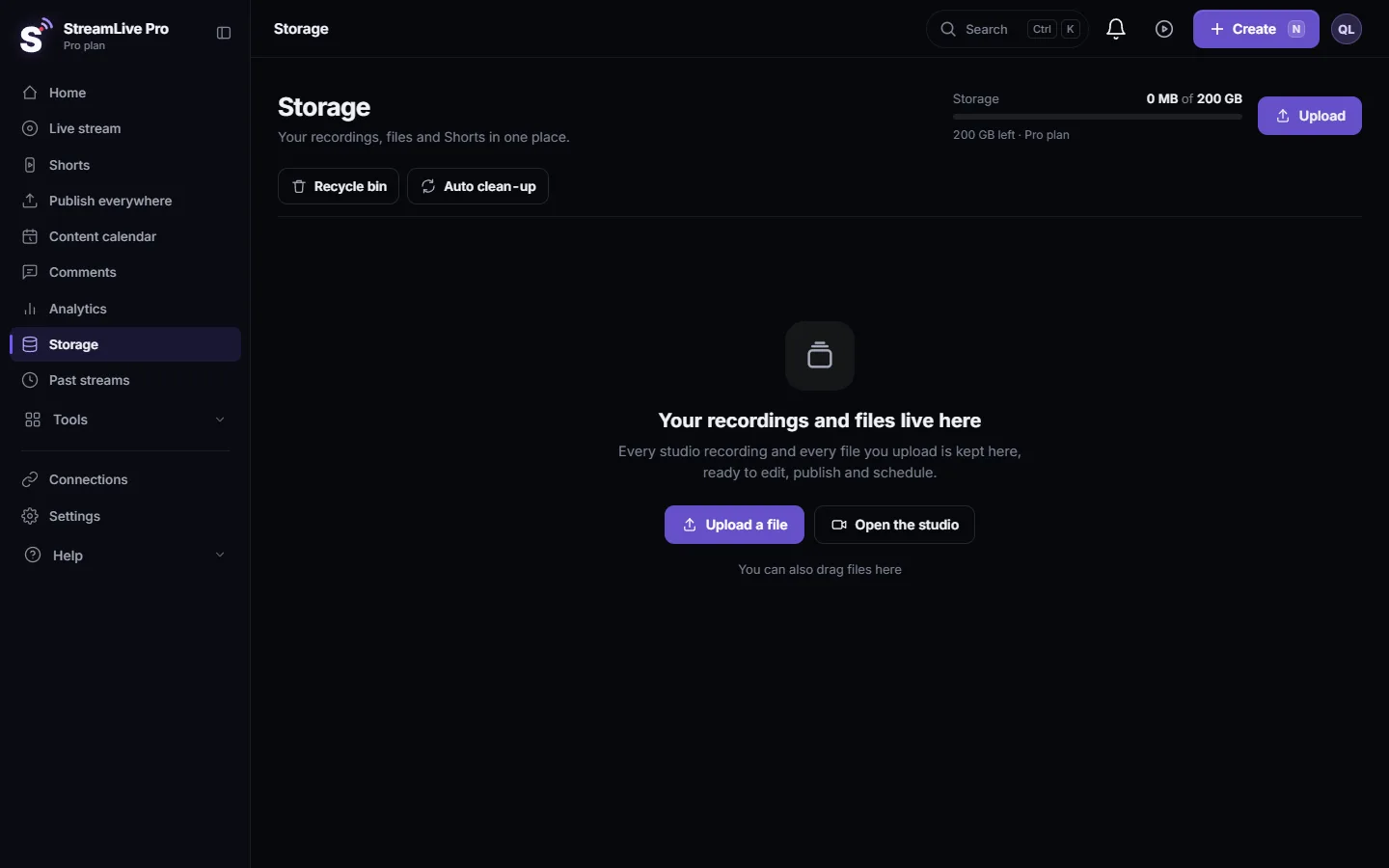
What stays and what stops
Stays after the trial:
- Signing in, your profile and settings.
- Your files: uploads, kept recordings, Shorts, exports, projects. You can watch, download and delete them.
- Your connected networks in Connections. They stay connected, but a network can still ask you to reconnect after some time; see Reconnect a channel whose connection expired.
- A connection to ChatGPT or Claude. It answers questions about the account, and anything that creates or publishes is refused until you choose a plan.
Stops after the trial:
- Going live, from the browser studio, the phone or anywhere else.
- New Shorts, translations and video editor exports.
- Publishing and scheduled posts.
Two things to know. A full broadcast recording is kept only if you pressed Record or chose to keep it; that rule did not change with the trial, see Where is my live stream recording?. And if the account becomes a paid plan later, the limits of that plan apply from that moment.
When to contact support
Write to [email protected], or use When you are connected to a person, if a file you made in the trial is missing, if you were charged without choosing a plan, or if the account says the trial ended before 7 days passed and you did not use up a trial limit. Send the email address of the account, the date you signed up, and a screenshot of the message you see.
Frequently asked questions
Will I be charged when the trial ends?
No. The trial needs no card and does not turn into a paid plan by itself. You are charged only if you choose a plan and pay.
Are my videos deleted when the trial ends?
No. Your files stay, and you can still watch, download and delete them. Download anything you want to keep outside StreamLive Pro.
Can I still download my Shorts after the trial?
Yes. Downloading keeps working. Making new Shorts, exporting and publishing need a plan.
Do I have to connect my networks again after I pay?
No. Connections stay with the account. If a network asks for a new sign-in, reconnect it on the Connections page as usual.
Does my ChatGPT or Claude connection stop when the trial ends?
No. The connection stays, and the assistant can still read the account. Anything that goes live, makes Shorts or publishes is refused until you choose a plan.
Keep reading
The Content calendar shows every scheduled post and live and what happened on each network: list, week and month views, filters, statuses and what to do next.
How to live stream a product launchHow to live stream a product launch: announce it ahead, live demo or a pre-recorded video at a set time, questions from the chat, and Shorts that keep selling after.
What ChatGPT and Claude cannot do in StreamLive ProThe limits of ChatGPT and Claude in StreamLive Pro, with the reason for each and what to do instead: connecting networks, TikTok posts, uploads, approvals and more.
AI clip makers compared: OpusClip, Klap, Vizard (2026)AI clip makers compared from each company's own pages: OpusClip, Klap, Vizard and StreamLive Pro. Prices, video sources, Hebrew and where each one fits.
Want to try it? 7-day trial, no credit card.
Start free