 StreamLive Pro
When you reach a limit: what the message means
What StreamLive Pro shows when an action reaches a limit of your plan, what the numbers mean, what happens after you upgrade, and what to do when a payment did not go through.
Every plan has limits: how much storage, how many channels, how many posts can be scheduled, how many uploads run at once. When something you do reaches one of them, StreamLive Pro stops that one action and tells you, in plain words, what happened.
What the message says
- What was stopped, for example "Your plan does not include scheduling this many posts".
- The numbers, when there are numbers: how much you used and what the limit is, for example storage used out of the storage in your plan.
- Two choices: see what a bigger plan includes, or Maybe later. Nothing else in your account changes.
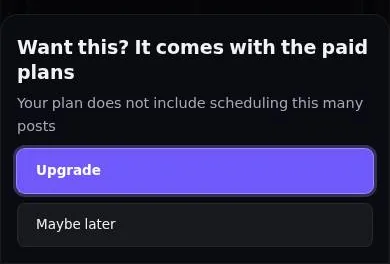
Common limits you may meet: storage is full; too many uploads at the same time (wait for one to finish); more channels than your plan includes; too many inputs in one broadcast; podcast shows or episodes over the plan's number.
Pick up where you left off
If you upgrade from that message, you do not have to start again. When you are back on the page, a card says Your plan is active. Pick up where you left off, with one button that runs the same action again: the same post, the same schedule, or the same file back in the Shorts window.
When a payment did not go through
If the reason is a payment that failed, the message says The payment did not go through and offers one button: Update payment method. It does not send you to the plans list.
On a trial
A trial includes most of the product. The message tells you when an action needs a paid plan, before anything is charged. A trial never turns into a paid plan by itself.
Frequently asked questions
I upgraded but the action did not run.
Use the "Pick up where you left off" card that appears after the payment. If you paid in a separate page, pick the file again when asked.
My storage is full. What can I do?
Delete old recordings or uploads you do not need, or move to a plan with more storage.
Why can I not start another upload?
Your plan allows a set number of uploads at the same time. Wait for one of them to finish and try again.
Keep reading
A plain-words comparison: prices, what each limit means, what happens when you reach one, and how to upgrade or move to a cheaper plan.
Why StreamLive Pro: what you get, and what to knowWhat the product does well, where it saves work and money, and the limits worth knowing up front.
Plans, billing and limitsWhich plans exist, what exactly each limit applies to, what happens when you reach one, and how the subscription, invoices and cancellation work.
Want to try it? 7-day trial, no credit card.
Start free