 StreamLive Pro
Post a video, photo or text to LinkedIn
Post a video, photo or text to your LinkedIn profile from StreamLive Pro, now or scheduled. What LinkedIn accepts, and why company pages are not available yet.
StreamLive Pro posts to your personal LinkedIn profile: a video, a photo, or a text post, now or at a time you set. Connect LinkedIn once, tick it on Publish everywhere next to your other networks, and publish. Posting as a LinkedIn company page is not available yet.
LinkedIn Live is a separate thing, with its own approval from LinkedIn. For that, see How to go live on LinkedIn with a custom stream.
Before you start
- LinkedIn connected. In Connections choose LinkedIn and sign in. The connection appears as Personal profile.
- A file LinkedIn accepts. Video as MP4 or MOV. Photos as JPG, PNG or GIF. Or no file for a text post, which then needs text.
- Your own profile, not a company page. If a company page is picked as the destination, nothing is posted and the result asks you to choose your personal profile.
Steps
- Connect LinkedIn. In Connections choose LinkedIn, sign in with the LinkedIn account you post from and approve.
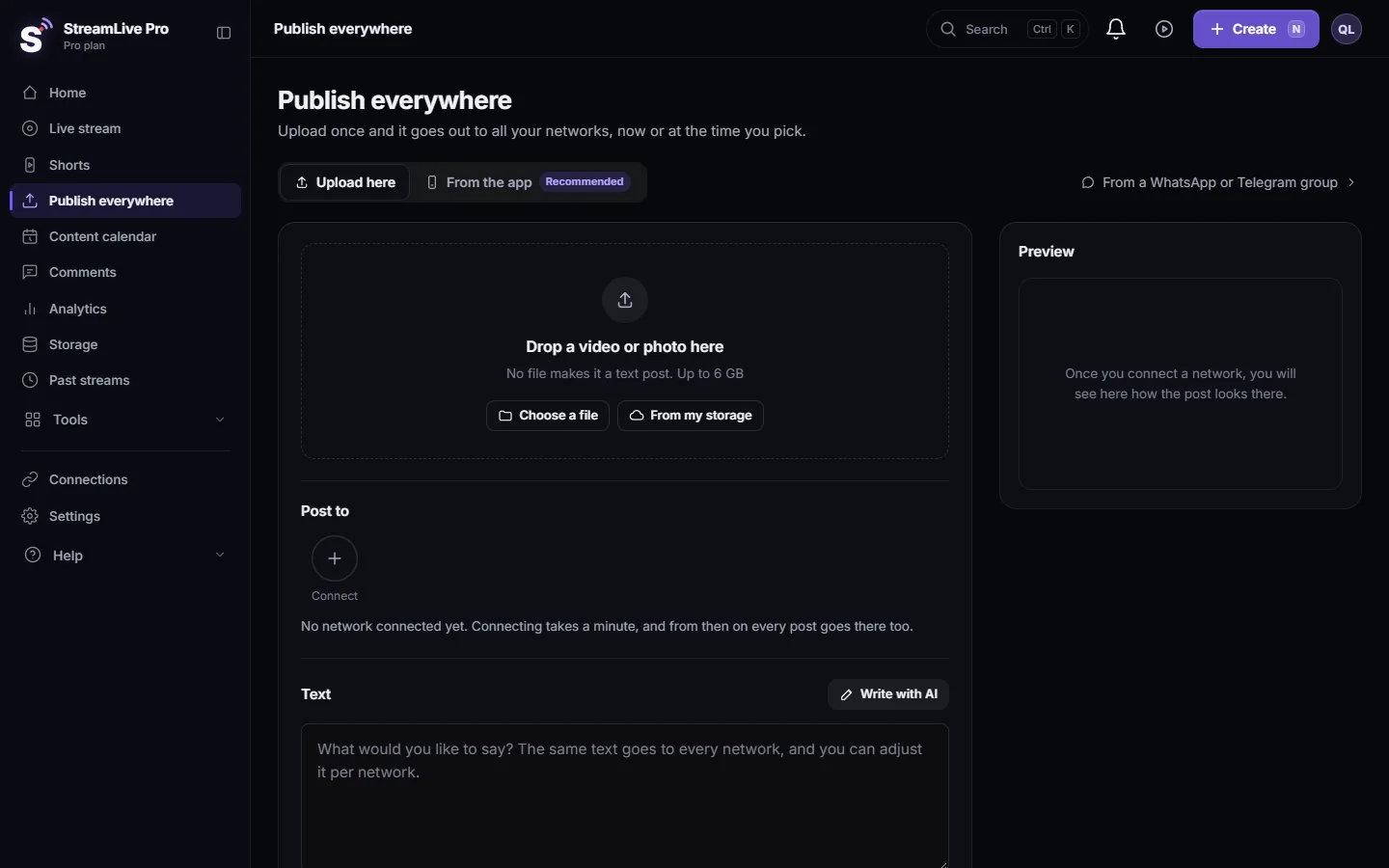
- Open the publish screen. Click Publish everywhere. Drop the video or photo on Drop a video or photo here (or click Choose a file), or add no file for a text post.
- Write the text. A text longer than 3,000 characters is cut at 3,000.
- Give LinkedIn its own text if you like. Open Adjust per network, choose the LinkedIn tab and tick the box for a different text. See Adjust the post for each network.
- Pick LinkedIn. Under Post to click your LinkedIn profile so it is selected.
- Publish or schedule. Under When choose Now, or Schedule and a date and time, then click the button at the bottom.
- Open the post. In Activity, lower on the same page, the LinkedIn mark on the post links to it in your feed.
What LinkedIn gets
| What you post | What appears on LinkedIn |
|---|---|
| MP4 or MOV video | A video post on your profile |
| JPG, PNG or GIF photo | A photo post |
| Text only | A text post |
| Any other file type | Refused before anything is posted, with the reason |
The post is public on your profile. Video goes up with your text as the post text.
One video, LinkedIn and the rest
LinkedIn is one tick among the others. The same upload can go to LinkedIn, your YouTube channel, your Facebook Page and Instagram in one publish, and each network gets its own result: a link, or the reason it failed. A failure on one network does not stop the others, and Retry sends again only to the network that failed. How many accounts you can tick in one publish depends on your plan; see /pricing?lang=en.
Scheduled posts and the LinkedIn sign-in
A LinkedIn sign-in does not last forever. When it expires, StreamLive Pro marks the connection Needs reconnecting and you get a reconnect notice. A post scheduled for next week uses the connection as it is at that moment, so if you see the mark, reconnect before the time arrives. If the post already failed for this reason, reconnect and press Retry; nothing was posted the first time.
Deleting a LinkedIn post
Delete everywhere in Activity removes the post from LinkedIn as well, as long as the connection is still valid. See Delete a published post from every network.
What can go wrong
| Symptom | Likely cause | Fix |
|---|---|---|
| "Posting to a LinkedIn Company page is not available yet" | A company page was picked | Choose your personal profile |
| "LinkedIn accepts JPG, PNG or GIF images and MP4/MOV video only" | Another file type, for example WebM | Export the video as MP4 and upload again |
| "A LinkedIn text post needs text" | No file and no text | Write text, or add a file |
| The post failed with a reconnect message | The LinkedIn sign-in expired | Reconnect LinkedIn in Connections, then Retry. See Reconnect a channel whose connection expired |
| My text is shorter on LinkedIn | It was over 3,000 characters | Give LinkedIn its own shorter text |
Related pages
- Publish a finished video to social networks
- Schedule social media posts to several networks at once
- Post to Threads, Bluesky and Telegram at the same time: three more networks from the same screen.
- How to go live on LinkedIn with a custom stream: LinkedIn Live.
Frequently asked questions
Can StreamLive Pro post a video to LinkedIn?
Yes. Upload an MP4 or MOV video, tick your LinkedIn profile and publish now or on a schedule.
Can I post as my company page?
Not yet. Posting goes to your personal profile. If a company page is picked, nothing is posted and you are asked to choose your profile.
Can I schedule LinkedIn posts?
Yes. Choose Schedule and set the date and time. The post goes out at that time even if your computer is off.
How long can the text be?
Up to 3,000 characters. Longer text is cut, so give LinkedIn its own text if your main text is long.
Is posting a video the same as LinkedIn Live?
No. Posting uploads a finished video. LinkedIn Live is a live broadcast that needs LinkedIn's approval first.
Keep reading
Find your best time to post from your own posts: the heatmap by day and 3-hour block, how many posts it needs, and how scheduling and Publish all use it.
My video upload failedVideo upload failed in StreamLive Pro? The file may be over 6 GB, bigger than your free storage, or the upload was cut off. What each message means and the fix.
My YouTube upload is waiting in a queueYour YouTube upload says it is queued? Why it waits for midnight Pacific time, how to check when it starts, and what to do when it cannot wait.
Use the Content calendar for posts and livesThe Content calendar shows every scheduled post and live and what happened on each network: list, week and month views, filters, statuses and what to do next.
Want to try it? 7-day trial, no credit card.
Start free