 StreamLive Pro
Add captions to a Facebook video (SRT or burned in)
Add captions to a Facebook video: make an SRT in StreamLive Pro and attach it to the video on your Page, or burn the captions in for Reels and shares.
There are two ways to put captions on a Facebook video. Attach an SRT file to the video, so viewers can switch it on and off, or burn the captions into the picture, so they show everywhere the video goes. StreamLive Pro makes both: correct the text in Translate and subtitles, then download SRT — Subtitles or render MP4 — Burned-in subtitles.
Which way to choose
| You are posting | Use | Why |
|---|---|---|
| A long video on a Facebook Page | An SRT file attached to the video | Viewers can turn it off; you can add another language later |
| A Reel or a short vertical clip | Burned-in captions | The design travels with the video and shows in every feed |
| A video that will be shared on WhatsApp too | Burned-in captions | A caption file does not travel with a downloaded or forwarded video |
| Hebrew captions with a highlight on the spoken word | Burned-in captions | An SRT carries text and timing only |
Before you start
- The final cut. Captions are timed to the file you upload to StreamLive Pro. Upload the same cut you post to Facebook.
- Minutes. Transcription and translation use the plan's translation minutes; amounts per plan are on the /pricing?lang=en. The trial includes 10 translation minutes, for videos up to 10 minutes long. Burned-in videos made during the trial carry a small watermark.
- Facebook's own steps. Facebook decides where the captions option sits in its editor and changes it from time to time. Its help page is the reference: Add or remove captions on a Facebook video.
Steps
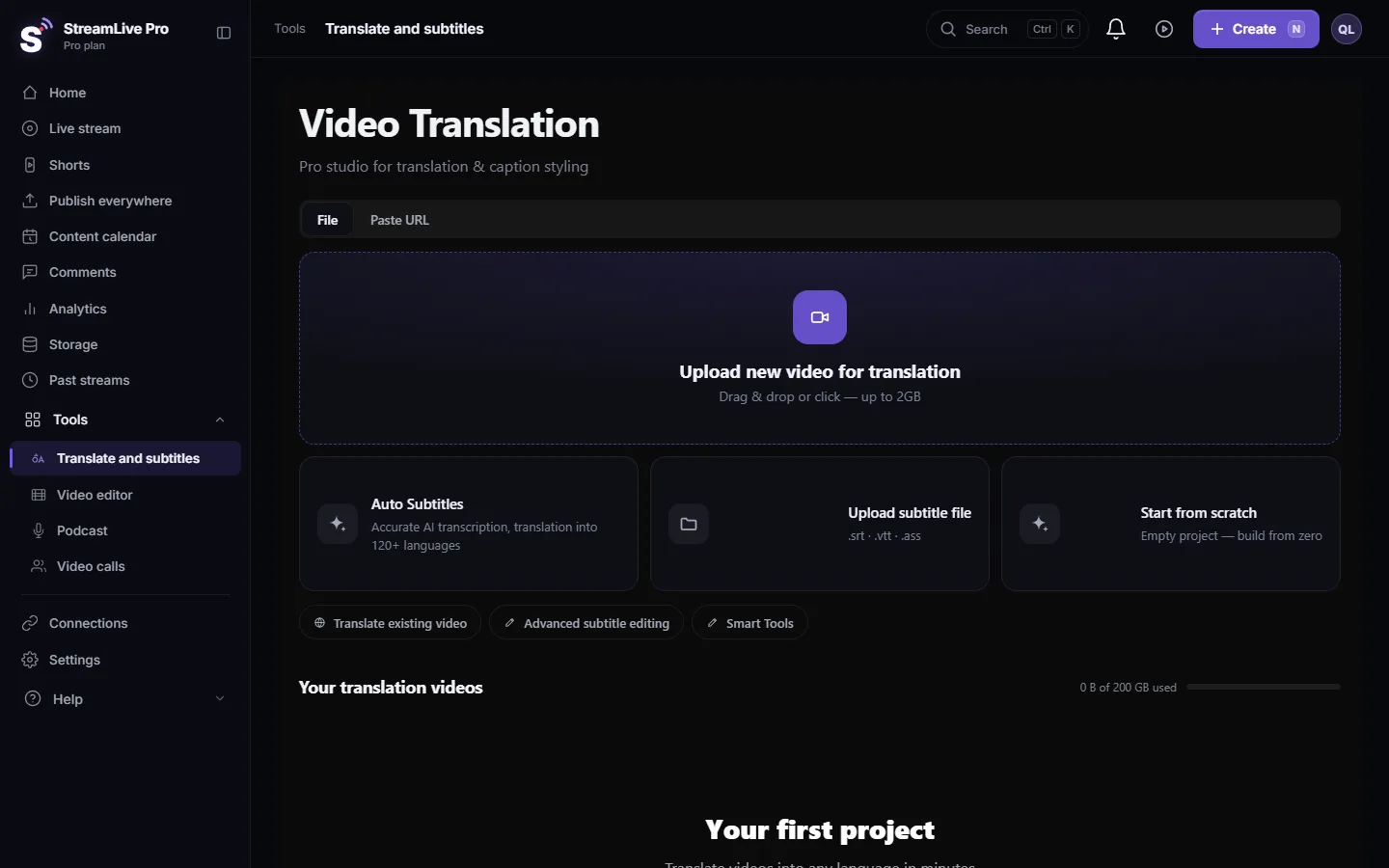
- Upload the video. Open Translate and subtitles and press Upload new video for translation.
- Set the languages. Choose the spoken language under Source language. Under Target language choose the same language for a transcript, or another language for translated captions. Press Start translation.
- Correct the text. In Subtitles, click a line to hear it and fix names, numbers and terms.
- For a caption file: press Export and choose SRT — Subtitles. The file downloads straight away.
- For burned-in captions: pick a design in Templates, then press Export and choose MP4 — Burned-in subtitles. The render runs on our server.
- Post the video on your Page. Upload it in Facebook, or post it from Publish everywhere if your Page is connected; see Publish a finished video to social networks. A burned-in video is finished at this point.
- Attach the SRT on Facebook. Open the video's edit settings on your Page, find the captions or subtitles section, upload the SRT and choose its language. Follow Facebook's page above for the exact names in your account.
- Watch it once with captions on. Check the first line, the last line and a line with punctuation.
When Facebook refuses the file name
Facebook can be strict about how a caption file is named, and its rules are its own. If it rejects the file because of its name, rename the file exactly the way Facebook's message or help page asks and upload it again. Change only the name: do not open and re-save the contents, which can strip the direction marks or change the encoding.
Hebrew and Arabic on Facebook
Our SRT starts every Hebrew or Arabic line with an invisible right-to-left mark, so a question mark or full stop stays on the correct side in players that follow the standard. If a line still looks reversed on Facebook, test the burned-in version: in a burned video the direction is fixed in the picture and does not depend on the player. More: Hebrew captions in the wrong direction.
What can go wrong
- The upload button refuses the file. Check the name (above) and that the file was not re-saved by a text editor in another encoding. Download it again from Translate and subtitles.
- Captions appear late or early. The video on Facebook is not the same cut you captioned. See Captions out of sync.
- No place to attach a file. If the format you post in (a Reel, for example) does not offer a captions upload in your account, burn the captions in.
- Watermark on the video. Burned-in videos from the trial carry it; see The trial watermark and TikTok.
- Captions on a live broadcast. Not available: captions that viewers see during a live are not offered. Caption the recording after the broadcast; see Transcribe a live stream after the broadcast.
Related pages
- All formats and what each keeps: Export captions as SRT, VTT or ASS
- Burning in detail: Burn captions into a video
- The same for YouTube: Upload SRT captions to YouTube
Frequently asked questions
Can I add an SRT file to a video on a Facebook Page?
Yes. Facebook lets you upload a caption file to a video you post. Make the SRT in StreamLive Pro and attach it in the video's edit settings on your Page.
Should Reels get a caption file or burned-in captions?
Burned-in captions. They are part of the picture, so they show in every feed and when the clip is shared.
Why does Facebook reject my SRT file?
Often the file name or the encoding. Rename the file the way Facebook's message asks, and if the file was re-saved in a text editor, download it again from StreamLive Pro.
Can I add captions in more than one language?
With caption files, yes: make one SRT per language and upload each with its own language. Burned-in captions are one language per video.
Can StreamLive Pro caption my Facebook live while it runs?
No. Live captions are not available. Captions are made from the recording or an uploaded video.
Keep reading
Open vs closed captions: burned into the picture or sent as a file the viewer can switch off. What each is good for, which networks take which, and how to make both.
My transcript came out in the wrong languageTranscript in the wrong language? Auto-detect decides from the opening of the video and keeps that choice. Set the source language yourself and run it again.
Edit captions on the timelineEdit captions on the StreamLive Pro editor timeline: move a line, drag its edges to retime it, split it, change its text on the video, and shift the lines after it.
A weekly Torah class online: live, Shorts and a podcastHow to run a weekly Torah class online: a weekday live, scheduling ahead, Shorts with Hebrew captions, translation for students abroad and a podcast episode.
Want to try it? 7-day trial, no credit card.
Start free