 StreamLive Pro
Short or regular video: how each network gets your video
How StreamLive Pro decides if your video goes out as a YouTube Short, a Reel or a regular video: shape and length per network, and how to get the other one.
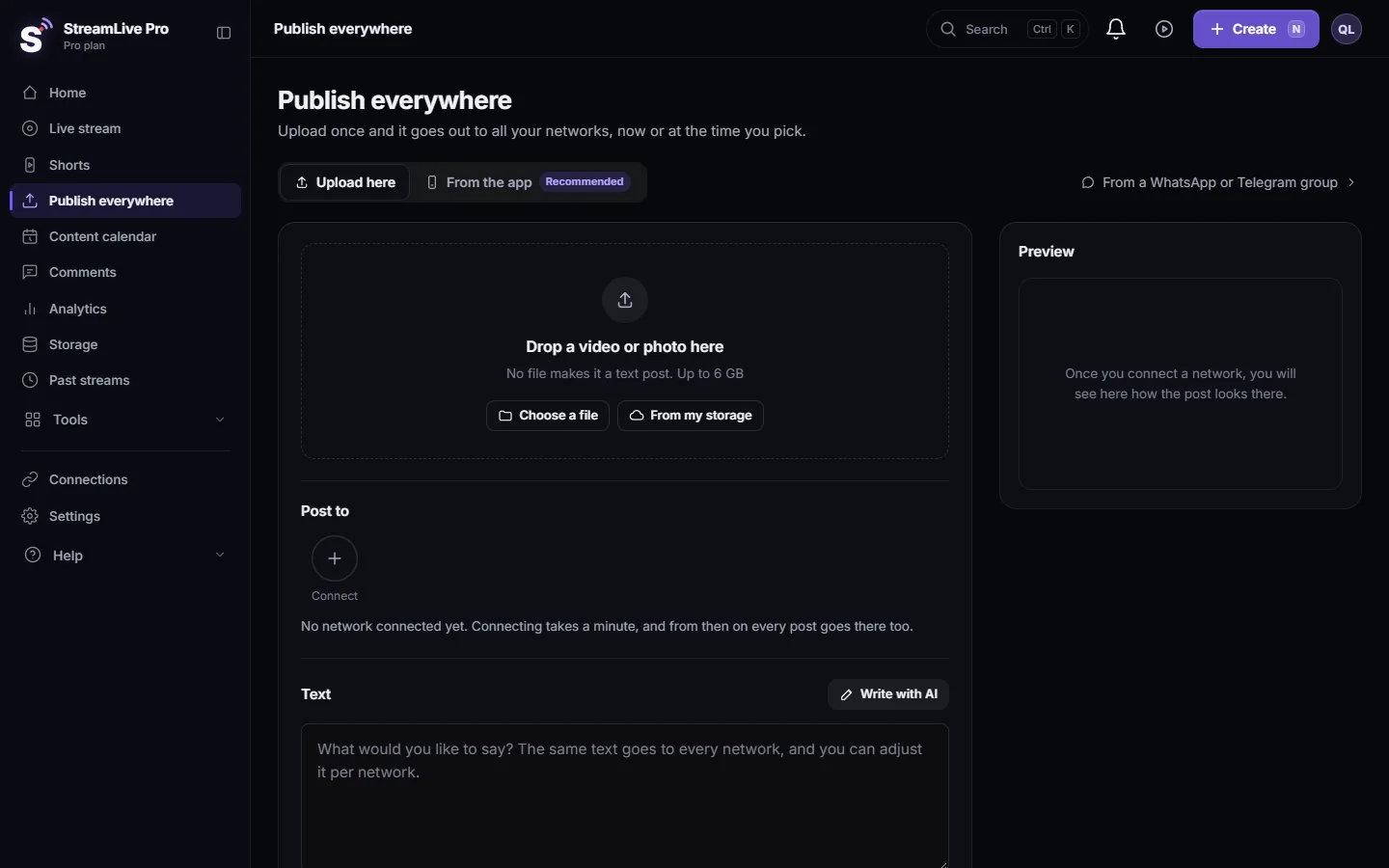
You do not choose "Short" or "regular video" on the Publish everywhere page. The page looks at two things in your file, its shape and its length, and sends each network the format that fits. A vertical video of three minutes or less goes to YouTube as a Short; a horizontal or longer one goes as a regular video. Facebook gets a Reel only when the vertical video is 90 seconds or shorter. Instagram and TikTok always get their short-video format. The badge on the file and the list Where it goes show the decision before you publish.
The rules per network
| Network | Goes out as a short format when | Otherwise |
|---|---|---|
| YouTube | Vertical (taller than wide) and 3 minutes or shorter: a Short | A regular video |
| Facebook Page | Vertical and 90 seconds or shorter: a Reel | A regular Page video |
| Every video: a Reel | (no other video format) | |
| TikTok | Every video: a TikTok video | (posted by hand only) |
| LinkedIn, Threads, X, Telegram and others | No short format | A video post |
"Vertical" means the picture is taller than it is wide. A square video counts as not vertical on this page.
What the networks say
- YouTube. A video with "a square or vertical aspect ratio up to three minutes in length" counts as a Short: Understand three-minute YouTube Shorts (checked 5 November 2026). YouTube makes the final decision on its side, so a square video under three minutes may still appear as a Short there.
- Facebook. Reels published by apps must run "3 to 90 seconds": Reels publishing (checked 5 November 2026). That is why a 2-minute vertical video goes to a Page as a regular video.
Three examples
For example, the same post ticked for YouTube, a Facebook Page and Instagram:
| The file | YouTube | Facebook Page | |
|---|---|---|---|
| Vertical, 45 seconds | Short | Reel | Reel |
| Vertical, 2 minutes | Short | Regular video | Reel |
| Horizontal 16:9, 2 minutes | Regular video | Regular video | Reel |
The last row matters: Instagram turns every video into a Reel, so a horizontal video shows there with bars or cropped. For Instagram, a vertical version looks better.
Where you see the decision
- The badge on the file. After you add a video on the Publish everywhere page, the file line says Vertical or Horizontal, the length, and a badge: "Short: goes out as Shorts, Reels and TikTok" or "Regular video". The badge sums up the YouTube rule; the per-network list is the exact answer.
- The list Where it goes. Next to the preview, each ticked account has its format: Shorts, Reel, TikTok or Video.
- The preview. Switch networks above the preview. A short format shows a tall 9:16 card; a YouTube regular video shows a 16:9 card with the title.
How to get the other format
| You want | Do this |
|---|---|
| A YouTube Short, but it says Video | Make the video vertical and 3 minutes or shorter: Turn a horizontal video into a vertical 9:16 video, or trim it in the editor |
| A regular YouTube video from a vertical clip | Not possible from this page; YouTube itself treats a short vertical upload as a Short |
| A Facebook Reel from a 2-minute vertical video | Trim it to 90 seconds or less |
| A Short from a long broadcast | Let StreamLive Pro cut Shorts from it: How to create Shorts from any video, no live stream needed |
Good to know
- The length is read from the file in your browser. If the browser cannot read it, the badge may not show; the network still classifies the video on its side.
- YouTube's daily number of automatic uploads per plan applies to Shorts and regular videos alike: The daily limit on YouTube uploads.
- TikTok posts are made by a person from this page; they cannot be scheduled: Post a video to TikTok from your computer.
Related: Post a Short to YouTube Shorts, Reels and TikTok, Upload a video to YouTube from StreamLive Pro, Post Instagram Reels from your computer, Adjust the post for each network.
Frequently asked questions
Why did my video go to YouTube as a Short?
It is vertical and 3 minutes or shorter, which is what YouTube treats as a Short.
Can I choose Short or regular video myself?
Not with a switch. The format follows the shape and length of the file. Change the file to change the format.
Why did Facebook get a regular video and not a Reel?
The video is longer than 90 seconds or not vertical. Facebook takes Reels from apps only up to 90 seconds.
Does Instagram get a feed video or a Reel?
A Reel. Every video to Instagram from this page goes out as a Reel.
Does a square video count as a Short?
On this page a square video is not counted as vertical, so the badge says Regular video. YouTube decides on its side and may still show a short square video as a Short.
Keep reading
Schedule one post to YouTube, Facebook, Instagram, Threads, Telegram and more from one screen, then edit, copy or cancel it in the Content calendar.
My post failed on one networkA post went out on some networks and failed on one. How to read the reason, fix the usual causes, and send it again only to the network that failed.
Delete a published post from every networkRemove a post you published from YouTube, Facebook, LinkedIn and X in one step with Delete everywhere, and what to do on Instagram, TikTok and the others.
Post a Short to YouTube Shorts, Reels and TikTokPost one Short to YouTube Shorts, Instagram Reels and TikTok from StreamLive Pro: connect the accounts, pick them, fill TikTok's form, publish. TikTok is manual only.
Want to try it? 7-day trial, no credit card.
Start free