 StreamLive Pro
Post Instagram Reels from your computer
Post Instagram Reels, photos and Stories from a computer with StreamLive Pro: the account you need, how videos become Reels, scheduling, and what Instagram refuses.
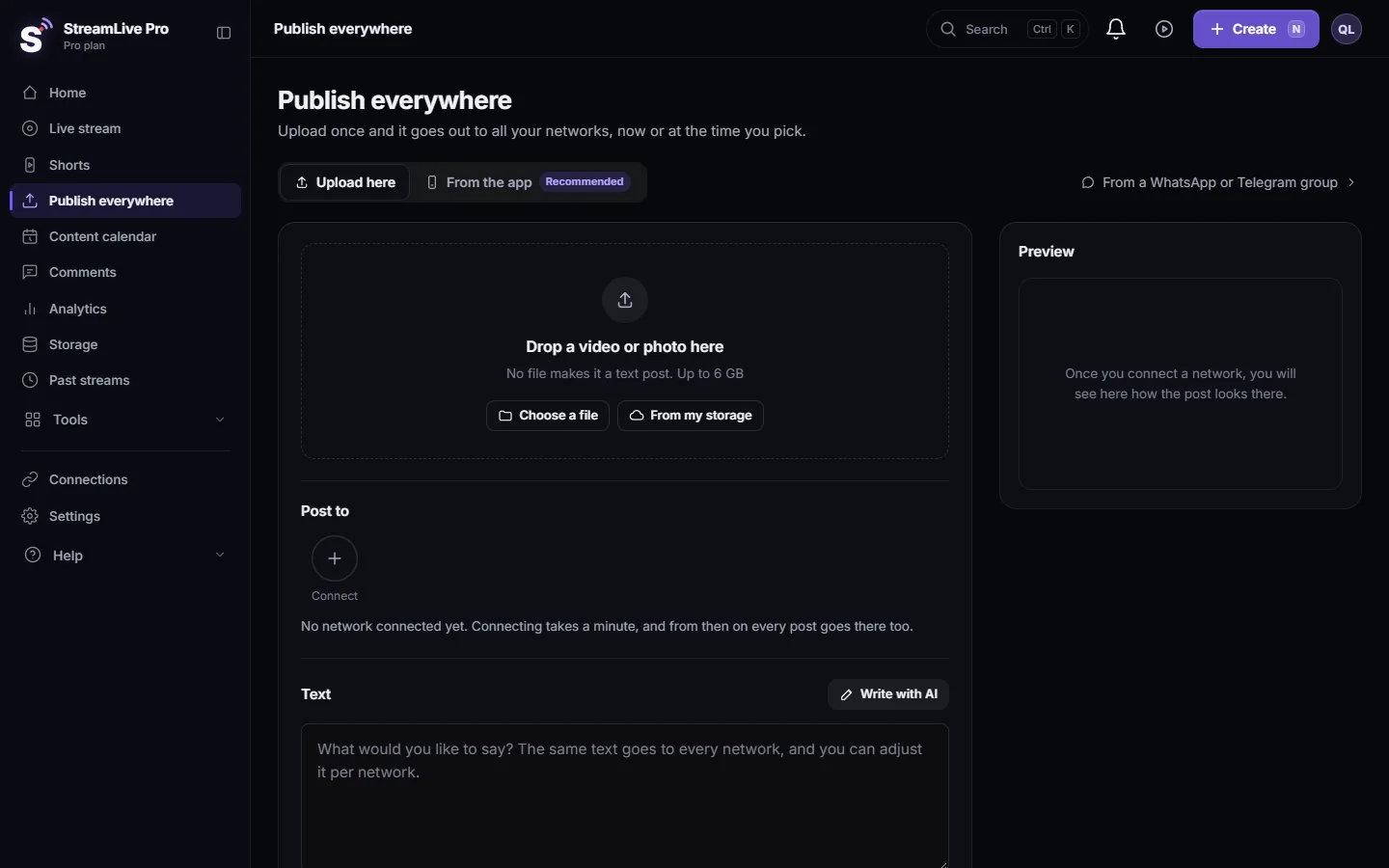
Instagram's own app is built for the phone. With StreamLive Pro you post from the computer: connect your Instagram business or creator account, open Publish everywhere, add the video, tick the account and publish now or on a schedule. Every video goes out as a Reel. Photos go out as photo posts. You can send either one to your Story instead, but not as a Reel and a Story in the same post.
Before you start
- A business or creator account. StreamLive Pro posts to Instagram accounts of the type Business or creator account. If yours is a personal account, Instagram lets you change the account type in its own settings.
- Linked to a Facebook Page you manage. The Instagram account connects through Facebook. In Connections choose Instagram, sign in with Facebook, and in Facebook's window tick both the Instagram account and the Page it is linked to.
- A video or a photo. Instagram does not take text-only posts. Without a file the screen shows that Instagram needs a video or an image.
Steps
- Connect Instagram. In Connections choose Instagram and sign in. Tick the Instagram account and its Facebook Page in Facebook's window.
- Add the video. Open Publish everywhere. Drop the video on the area that says Drop a video or photo here, click Choose a file, or click From my storage to use a Short or recording you already have.
- Pick the account. Under Post to click the Instagram account so it is selected. The preview next to the form shows how the post will look there.
- Write the caption. Type it in the Text box; it becomes the Reel caption. To give Instagram a different caption from the other networks, open Adjust per network and use the Instagram tab.
- Leave the Story box as it is, unless you want only a Story. On the Instagram tab in Adjust per network, As a Story instead of a post sends the file to your Story in place of the Reel or photo post, not in addition to it. The tick is remembered for your next post, so check it before you publish.
- Publish or schedule. Under When choose Now, or Schedule and a date and time, then click the button at the bottom (for example "Publish to Instagram").
- Give it a few minutes. Instagram processes a video before it appears. The post shows in Activity, lower on the same page, as publishing until Instagram confirms, then with the link.
What goes out on Instagram
| What you upload | What appears |
|---|---|
| Any video | A Reel |
| A photo | A photo post. A PNG, WebP, GIF or HEIC photo is converted to JPEG first, because Instagram takes JPEG |
| Video or photo with As a Story instead of a post ticked | A Story instead of the Reel or photo post. Stories do not show the caption |
| Text only | Not possible on Instagram |
Captions in our Shorts are burned into the picture, so they show on the Reel as they look in StreamLive Pro.
How the upload works
Instagram does not accept a file pushed from your computer. It fetches the video from a web address. Your file is kept in your StreamLive Pro Storage and Instagram fetches it from there, so you can close the tab once the upload to StreamLive Pro is done. That is also why a scheduled Reel goes out on time with your computer off.
Deleting a Reel
Instagram does not let apps delete posts. Delete everywhere reports Instagram as "could not delete"; remove the Reel in the Instagram app. See Delete a published post from every network.
What can go wrong
| Symptom | Likely cause | Fix |
|---|---|---|
| The Instagram account does not appear | Its Facebook Page was not ticked when connecting | Reconnect, choose to edit the settings, tick the Page too |
| "Instagram needs a video or an image" | A text-only post | Add a video or a photo, or untick Instagram for this post |
| The Reel stays on publishing for a while | Instagram is still processing the video | Wait a few minutes; the result updates by itself |
| The Story has no text | Instagram Stories carry no caption | Put the text in the video itself |
| Only a Story went out, no Reel | As a Story instead of a post was ticked (it stays ticked from your last post) | Untick it on the Instagram tab and publish the video again |
| The post failed with a sign-in message | The connection expired | Reconnect in Connections, then Retry in Activity |
Related pages
- Post a Short to YouTube Shorts, Reels and TikTok: one Short to Reels, YouTube Shorts and TikTok.
- Post a video, photo or text to a Facebook Page: the same video on your Facebook Page.
- How to go live on Instagram from a computer: Instagram Live, which works with a stream key.
- Schedule social media posts to several networks at once
Frequently asked questions
Can I post Instagram Reels from a computer?
Yes. Connect your business or creator account, add the video on Publish everywhere, tick Instagram and publish. Every video goes out as a Reel.
Can I schedule Instagram Reels?
Yes. Choose Schedule, set the date and time, and the Reel goes out at that time even if your computer is off.
Does it work with a personal Instagram account?
No. StreamLive Pro posts to business or creator accounts linked to a Facebook Page. The account type is changed in Instagram itself.
Can one post go out as a Reel and as a Story?
No. With Also as a Story ticked, the file goes out only as a Story. For both, publish twice: once with the box ticked and once without it.
Why does my Story not show my caption?
Instagram Stories carry no caption text. Put the words in the video, as our Shorts do with burned-in captions.
Can I delete the Reel from StreamLive Pro?
No. Instagram does not let apps delete posts. Delete it in the Instagram app.
Keep reading
How StreamLive Pro decides if your video goes out as a YouTube Short, a Reel or a regular video: shape and length per network, and how to get the other one.
Schedule social media posts to several networks at onceSchedule one post to YouTube, Facebook, Instagram, Threads, Telegram and more from one screen, then edit, copy or cancel it in the Content calendar.
Post a Short to YouTube Shorts, Reels and TikTokPost one Short to YouTube Shorts, Instagram Reels and TikTok from StreamLive Pro: connect the accounts, pick them, fill TikTok's form, publish. TikTok is manual only.
Find your best time to post from your own resultsFind your best time to post from your own posts: the heatmap by day and 3-hour block, how many posts it needs, and how scheduling and Publish all use it.
Want to try it? 7-day trial, no credit card.
Start free