 StreamLive Pro
Post a video to TikTok from your computer
Post a video or Short to TikTok from your computer with StreamLive Pro: the TikTok settings you must fill, why it cannot be scheduled, and fixes.
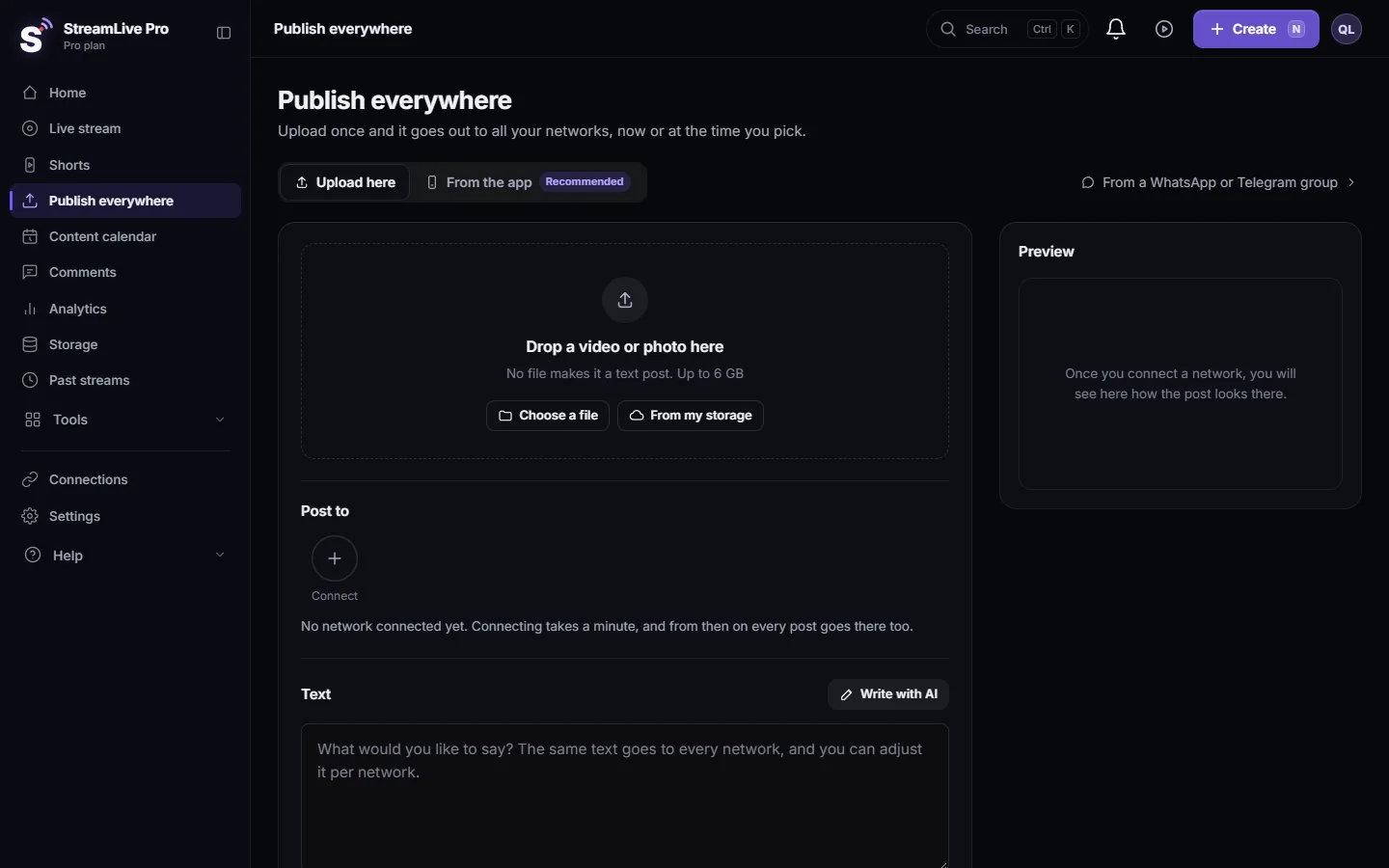
You can post a video to TikTok from a computer through Publish everywhere: tick your TikTok account, fill in TikTok's settings that appear under the networks, and press Publish. The post goes out at that moment, together with the other networks you ticked.
What you cannot do is let it happen without you. TikTok posts leave StreamLive Pro only when a person presses Publish on that screen. Scheduled posts, posts from WhatsApp or Telegram groups, posts made by ChatGPT or Claude, API posts and automatic retries are refused for TikTok.
Before you start
- TikTok connected in Connections (sign in with TikTok). It shows as TikTok account.
- A finished video, for example a Short made in Shorts. TikTok checks the length against what your account is allowed to post.
- During the trial, Shorts carry a small watermark. See The trial watermark and TikTok.
Steps
- Open the publish screen. Click Publish everywhere, or Publish on a Short's card. Add the video on Drop a video or photo here and write the caption in the Text box.
- Pick TikTok yourself. Under Post to click the TikTok account so it is selected. It is not ticked for you the first time, because TikTok requires its own choices for every post.
- Fill in TikTok's settings. They appear under the list of networks, with your TikTok account name. Choose who can view the video (the options are the ones TikTok allows for your account; nothing is chosen in advance). Choose whether to allow comments, Duet and Stitch.
- Disclose commercial content if it applies. If the video promotes your own business, a product or a paid partner, turn on the disclosure and pick Your brand, Branded content or both. TikTok then labels it.
- Read the consent line and publish. Under When keep Now and press the button at the bottom. Until every TikTok setting is filled, the button is greyed out, and pressing it shows TikTok still has a question below.
- Watch the result. The result for TikTok appears in Activity, lower on the same page, with a link when TikTok has processed the video.
These choices come from TikTok's own rules for apps that post for a creator: the privacy level has no default, comments, Duet and Stitch start off, and commercial content must be declared (TikTok Content Sharing Guidelines).
Why it cannot be scheduled
TikTok's rules ask that the creator chooses the audience and presses Publish for each post, after the app has shown their account and its current options. So StreamLive Pro does not post to TikTok on its own. When you schedule other networks, untick TikTok and post the TikTok version yourself when the time comes. In the Content calendar a TikTok line marked Manual on TikTok has a button, Open the TikTok form. See Schedule social media posts to several networks at once.
The same guidelines mention a daily cap on posts per creator account, shared by every app that posts to that account. If you post a lot from several tools, TikTok can refuse a post for that reason.
What can go wrong
| Symptom | Likely cause | Fix |
|---|---|---|
| "TikTok posts cannot be scheduled" | "Schedule" is chosen with TikTok ticked | Publish TikTok now, or untick it and schedule the rest |
| TikTok still has a question below | A TikTok choice is empty | Choose who can view and the other settings under the networks |
| "The TikTok settings on this screen are out of date" | The form was open more than about half an hour | Untick TikTok and tick it again, check your choices, publish |
| The video is in TikTok's drafts, not on the profile | The account gave only the upload permission | Finish it in the TikTok app, or reconnect TikTok with the publish permission |
| Nothing reached TikTok from a group or an assistant | Automatic posts are refused for TikTok | Post it from the publish screen |
| The post failed with a length message | Longer than TikTok allows for your account | Trim the video or post a Short |
Related pages
- Publish a finished video to social networks
- Adjust the post for each network: the TikTok settings and per-network text.
- Post a Short to YouTube Shorts, Reels and TikTok
- How to go live on TikTok from a computer: going live on TikTok is a different process, with a stream key.
Frequently asked questions
Can I schedule a TikTok post with StreamLive Pro?
No. TikTok posts go out only when you press Publish on the publish screen. Schedule the other networks and post to TikTok yourself.
Can ChatGPT or Claude post to TikTok for me?
No. Requests from assistants and from the API are refused for TikTok. The assistant can prepare the rest; TikTok is posted by hand.
Why is TikTok not ticked automatically?
TikTok requires you to choose who can view, and the comment, Duet and Stitch settings, for every post. So you tick it yourself and fill them in.
My video ended up in TikTok drafts. What happened?
The TikTok connection had only the upload permission, not the publish permission. Finish the post in the TikTok app, or reconnect TikTok and approve publishing.
Does the trial watermark appear on TikTok?
Shorts made during the trial carry a small watermark, and it stays in the file wherever you post it. Paid plans have no watermark.
Keep reading
Post one Short to YouTube Shorts, Instagram Reels and TikTok from StreamLive Pro: connect the accounts, pick them, fill TikTok's form, publish. TikTok is manual only.
What ChatGPT and Claude cannot do in StreamLive ProThe limits of ChatGPT and Claude in StreamLive Pro, with the reason for each and what to do instead: connecting networks, TikTok posts, uploads, approvals and more.
How to create Shorts from any video, no live stream neededUpload a video and get edited Shorts: a short video becomes one Short, a long one is cut into several Shorts from its strongest moments. No live stream needed.
Automatic Hebrew captions on ShortsEvery broadcast or video can become vertical Shorts with Hebrew captions that read right to left, with punctuation in the right place. How it works and what you can change.
Want to try it? 7-day trial, no credit card.
Start free