 StreamLive Pro
My analytics are empty or numbers are missing
Analytics shows no data, no views or old numbers: accounts not switched on, missing permissions, Waiting for Meta approval, networks that give nothing, and the fix.
When Analytics is empty or a number is missing, the page almost always says why, on the account's card or in the place of the number. The three most common causes: the account is not switched on in Analytics (connecting it for publishing is a separate switch), the account was just switched on and its posts are still being brought in, or the network gives that number only with a permission that is missing or still waiting for the network's approval. Views on Facebook Pages are the usual example: Facebook gives reactions, comments and shares today, and views and reach after Meta approves the "read insights" permission.
Symptom, likely cause, fix
| What you see | Likely cause | Fix |
|---|---|---|
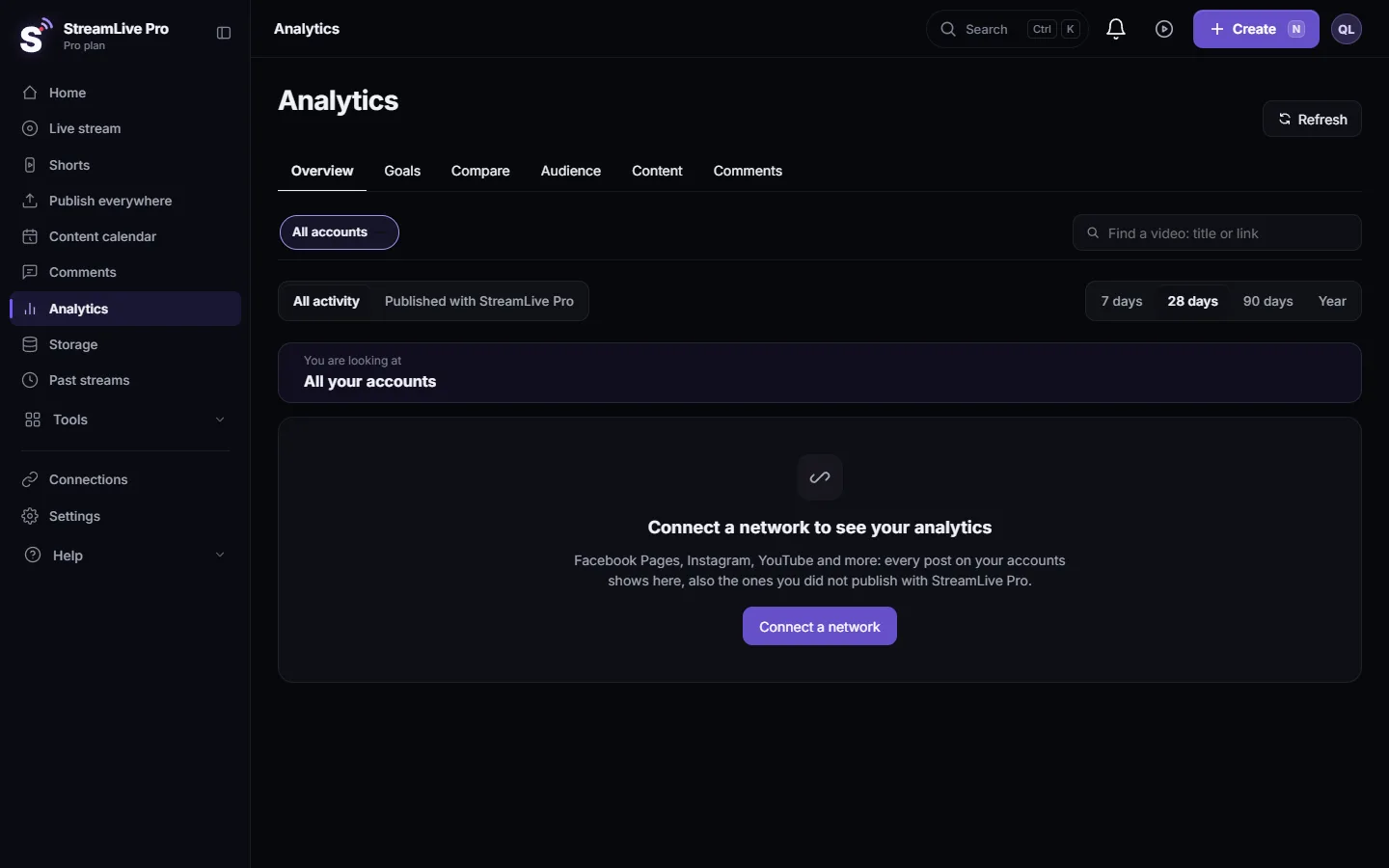
| Connect a network to see your analytics | No account is shown in Analytics | Connect one in Connections, then switch it on under Choose what Analytics shows |
| Bringing in your posts from ... | The account was just switched on | Wait a minute or two; the page updates by itself |
| No posts in this period | Nothing was published on these accounts in the period | Choose a longer period, or another account |
| Nothing published with StreamLive Pro in this period | The scope is set to Published with StreamLive Pro | Switch to All activity |
| Waiting for Meta approval | Facebook Page views, reach and audience need a permission Meta is reviewing | Nothing to do; they appear by themselves once approved |
| Needs a permission / Missing a permission | The connection lacks a read permission, for example Instagram insights | Click Reconnect and allow every permission |
| Reconnect needed / Connection stopped: reconnect | The network stopped accepting the connection | Reconnect: Reconnect a channel whose connection expired |
| No numbers from this network | The network gives apps no post numbers (LinkedIn, X, Kick; TikTok without its extra permission) | Use the network's own dashboard: Which networks give numbers to Analytics |
| Will retry soon / Last read failed, trying again | A short error on the last read | Nothing; it retries automatically |
| Watch time missing on a new YouTube video | YouTube gives it about 48 hours after publishing | Check again in two days |
| Too early to tell on a new post | The post is younger than 2 hours | Wait |
| A Facebook account says not available | It is a personal profile | Connect a Page; Meta gives numbers for Pages only |
Steps
- Check which accounts are shown. In Analytics click Choose what Analytics shows. Switch on each Page, channel or profile you want. Showing an account in Analytics only reads its numbers; nothing is published to it from there.
- Read the state of each account. The account switcher at the top shows a dot and a line for each one, for example "Synced 10 min ago" or "Missing a permission". The same states are listed under Need attention.
- Check the scope and the period. At the top, All activity shows everything on the accounts; Published with StreamLive Pro shows only what went out from here. A 7-day period after a quiet week can be empty.
- Reconnect where asked. A Reconnect button appears only where reconnecting helps. On the network's screen keep every permission ticked.
- Refresh if numbers look old. Accounts are read again every 30 minutes while you use Analytics, otherwise every few hours. Read every account again now forces a fresh read. If you just did, the page says "Already reading your accounts. Try again in a few minutes."
- Compare the same dates. If a total differs from the network's own dashboard, check that both cover the same dates and that newer numbers have arrived.
What is never shown
Analytics never estimates a missing number and never shows numbers about individual people. An empty place always means the network did not give it, with the reason written next to it. Live viewer counts during a broadcast are a separate screen and come from YouTube and Facebook only: See live viewers from YouTube and Facebook together.
When to contact support
If an account says Up to date but a post you can see on the network is missing after an hour, or numbers stop updating for a day while the account shows no problem, write to [email protected]. Send the account name and network, the link of a missing post, and a screenshot of the account switcher with its state line.
Related pages
- Read your social media analytics for every account
- Analytics for one post: reach, engagement and audience
- Which networks give numbers to Analytics
Frequently asked questions
Why does my Facebook Page show no views?
Facebook gives apps a Page's views and reach only with the read insights permission, which is waiting for Meta's approval. Reactions, comments and shares show already; views appear by themselves once it is approved.
Why is Analytics empty although my accounts are connected?
Connecting an account for publishing does not switch it on in Analytics. Click Choose what Analytics shows and switch the accounts on.
Why are my Instagram views missing but likes are there?
Instagram gives views, reach and saves only with its insights permission. Click Reconnect and allow every permission Instagram asks for.
How often are numbers updated?
Every 30 minutes for accounts you looked at in the last few days, otherwise every few hours. You can force a fresh read with Read every account again now.
Why are there no TikTok numbers?
TikTok gives post numbers only once its extra permission is on for your account. Until then the TikTok account says so.
Keep reading
Export social media analytics from StreamLive Pro: a CSV of numbers per day, a CSV of every post, or a PDF report of the account and period on screen.
Compare two accounts in Analytics, per followerCompare your social accounts side by side in Analytics: a ranking, 2 to 4 accounts in columns, and account vs account per follower, fair to small Pages.
The Audience tab: age, countries, devices and hoursThe Audience tab in Analytics shows who follows or watches one account: age and gender, countries and cities, devices, subscribers, and when followers are online.
Find a post in Analytics: search, sort, paste a linkFind any post or video in Analytics: search by words of the title, paste the post's link, filter videos, lives or posts, and sort by views or engagement.
Want to try it? 7-day trial, no credit card.
Start free