 StreamLive Pro
Automatic Hebrew captions for Premiere Pro, step by step
Automatic Hebrew captions for Premiere Pro: transcribe in StreamLive Pro, export SRT, import it as a caption track and check right-to-left text.
You edit in Premiere Pro and need Hebrew captions. Premiere has its own Speech to Text, but it only works in the languages on Adobe's list, so check that list for Hebrew in your version first (Languages supported by Speech to Text). When Hebrew is not there, the route that works is: transcribe the Hebrew in StreamLive Pro, correct it, download an SRT file, import it into Premiere as a caption track, and check the right-to-left text before you export.
This guide covers that route, what is inside the file we give you, and the places where Hebrew captions really break.
Pick the route before you start
| What you need at the end | Route | Why |
|---|---|---|
| Captions you can still edit and style inside Premiere | SRT from StreamLive Pro, imported into Premiere | The captions become a Premiere caption track |
| A caption file for YouTube next to the video | SRT straight from StreamLive Pro, no Premiere step | YouTube accepts SRT in plain UTF-8 (YouTube's list) |
| Designed captions with a highlight on the spoken word | Burn them in StreamLive Pro, bring the finished MP4 into Premiere | An SRT carries text and timing only, no design |
| Vertical Shorts with Hebrew captions | Skip Premiere: Automatic Hebrew captions on Shorts | Shorts are cut, framed and captioned for you |
What you need
- Premiere Pro, and the video you are editing, exported as a file (the final cut, or the clip you will caption).
- A StreamLive Pro account. The 7-day trial includes 10 translation minutes; minutes per month on each plan are on the /pricing?lang=en.
- Clear audio. One microphone close to the speaker gives far better text than a room microphone.
Steps
- Export the cut you will caption. Captions are timed from the first frame of the file you upload. The simplest case is the finished sequence exported from Premiere, because then the SRT lines up with the sequence from its very start.
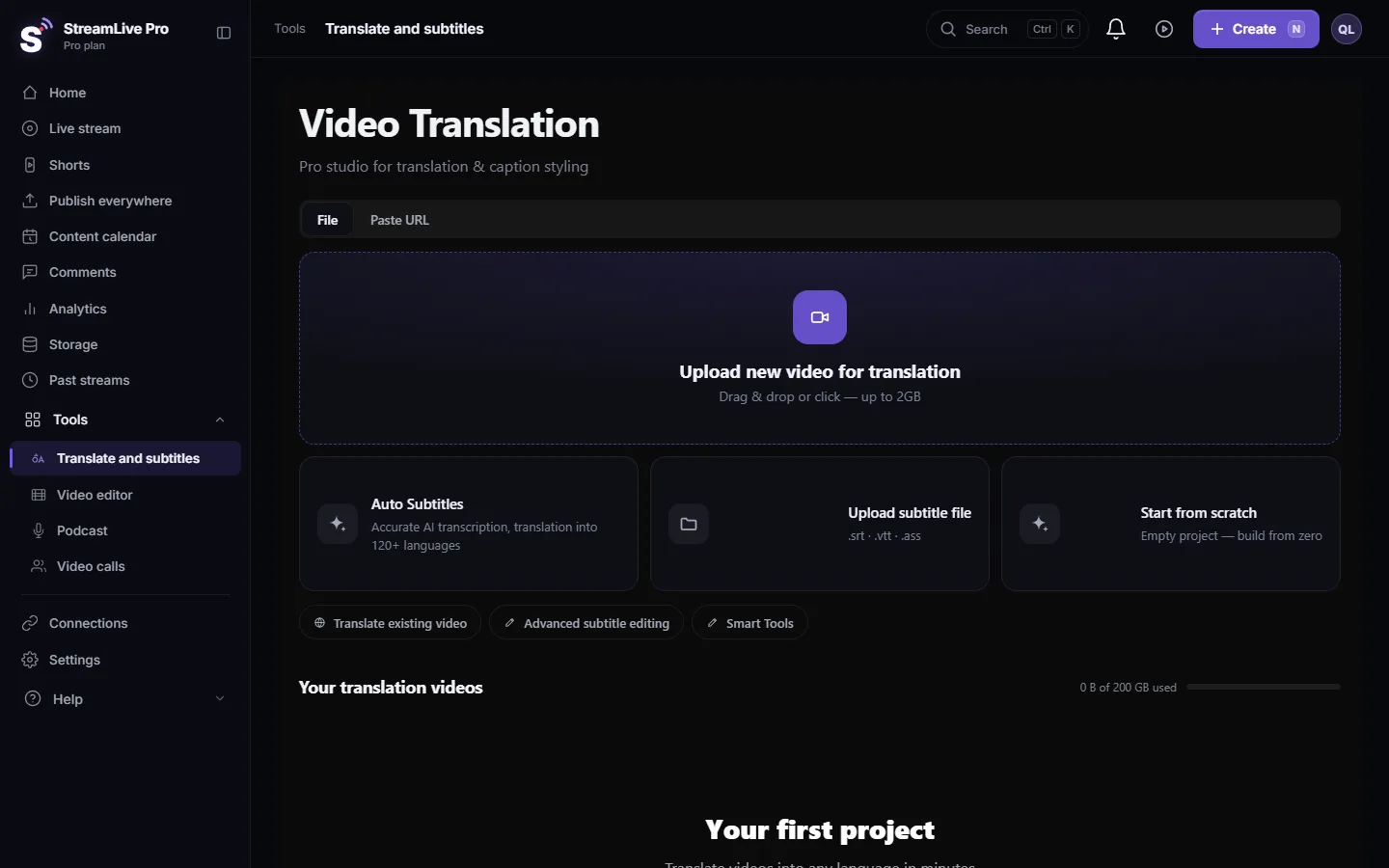
- Open Translate and subtitles. In the dashboard menu choose Translate and subtitles and press Upload new video for translation.
- Set Hebrew as both languages. In the settings window choose Hebrew under Source language and Hebrew again under Target language, then press Start translation. Same source and target means a transcript, not a translation.
- Correct the text. Open Subtitles. Every line sits in a list beside the video; clicking a line jumps to its moment. Fix names, terms and numbers here, not in Premiere: the file you download is built from this list.
- Download the SRT. Press Export and choose SRT — Subtitles. The file downloads at once.
- Import it into Premiere. Import the SRT into your project like any media file, then drag it from the Project panel into the sequence. Premiere creates a new caption track and places the captions on it. Adobe's steps: Import caption files from third-party services.
- Line it up. If you uploaded the whole sequence, put the first caption at the start of the sequence. If you uploaded one clip, put it at the start of that clip on the timeline.
- Check the right-to-left text. Run the checks in the next section, in the Program monitor, not only in the captions list.
- Export from Premiere. Burn the captions into the picture or export them as a separate file. Adobe's options: Export caption tracks.
What is inside the SRT we give you
Knowing this saves guesswork when something looks wrong:
- Plain UTF-8 text, which is what YouTube asks for and what Premiere reads.
- Each Hebrew line starts with an invisible right-to-left mark (Unicode RLM). A subtitle file has no direction of its own, so a Hebrew line that ends in a question mark or full stop can show that mark on the wrong side. The mark at the head of the line tells the player the line is right to left. Lines with no Hebrew in them are left as they are.
- Text and timing only. No font, colour or position. Premiere's caption style decides how it looks.
- Timing follows your edits. If you split a line or moved its edge in the editor, the file has the new times.
ASS, the format that carries our full caption design, is not on Adobe's list of supported caption formats (Supported caption file formats). For Premiere, use SRT.
Where Hebrew captions break, and how to check
Do not read the whole file. Look at five lines that test the hard cases:
| Check this line | What goes wrong | What it should look like |
|---|---|---|
| One that ends with "?" or "." | The mark jumps to the right, the start of the sentence | The mark at the left end |
| One with a number ("for example: chapter 12") | The number moves, or the words around it swap order | The number where it was said |
| One with an English word or a name in Latin letters | The Hebrew on both sides of it reorders | Hebrew reads right to left, the English word left to right inside it |
| A long line that wraps to two | The wrong half on top | The first half of the sentence on the top line |
| The first and the last caption | The whole track is offset | Each starts when the speech starts |
Then check the font. A caption style with a font that has no Hebrew letters shows empty boxes or falls back to another face. Pick a font that covers Hebrew in Premiere's caption style before you style anything else.
What to do when it is wrong
- Wrong word or name. Fix it in StreamLive Pro and download the SRT again, so the next export and every translation start from the right text. Small fixes inside Premiere are fine too, but they do not travel back.
- Punctuation or word order reversed in Premiere, correct in our editor. The file is fine; the difference is how your Premiere version lays out right-to-left text. Right-to-left support in Premiere's captions has changed between versions, so update Premiere, check the caption track's text settings in your version, and test a short export before the full one.
- You opened the SRT in a text editor and saved it. Some editors save in another encoding or strip invisible characters. Save as UTF-8, or download the file again.
- The captions drift later in the video. The file you uploaded is not the same cut as the sequence (for example, you trimmed after uploading). Upload the final cut again.
- You need the exact design you saw in our editor. Burn the captions in StreamLive Pro (MP4 — Burned-in subtitles) and place that video in Premiere. The cost: the text can no longer be edited in Premiere.
Common mistakes
- Translating before correcting the Hebrew. Every error is copied into every language. How to translate video subtitles into other languages explains the order.
- Styling first and checking direction last. A font change can move punctuation; check after the style is final.
- Uploading a draft cut. Captions are timed to the file you upload, so trim first.
- Checking only the captions list. Look at the picture in the Program monitor and in the exported file.
Where StreamLive Pro fits
StreamLive Pro does the part Premiere may not do for Hebrew: speech to text with a time for every word, a line list to correct it, and SRT, VTT or ASS files, or burned-in captions with more than 80 designs. The editing stays in Premiere. More detail on the caption engine: Automatic Hebrew subtitles — transcribe, edit, and burn them in; designs and what reaches a file: Caption templates and styles in depth; all formats: Export captions as SRT, VTT or ASS. Editing in Resolve instead: Import SRT captions into DaVinci Resolve.
What it does not do: captions that viewers see during a live broadcast are not available, and there is no dubbing. Captions are made from a recording or an uploaded video.
Frequently asked questions
Does Premiere Pro make Hebrew captions by itself?
Premiere's Speech to Text works only in the languages on Adobe's list. Check that list for your version; if Hebrew is not on it, transcribe elsewhere and import an SRT file.
Which file format should I import into Premiere?
SRT. It is on Adobe's list of supported caption formats and carries the text and the timing. ASS, which carries our design, is not on that list.
Why is the question mark on the wrong side?
A subtitle file has no text direction of its own. Our SRT adds an invisible right-to-left mark at the start of every Hebrew line to fix this. If it is still wrong in Premiere but right in our editor, the layout comes from your Premiere version; update it and test a short export.
Can I keep the karaoke highlight in Premiere?
Not through SRT, which has no styling. Burn the captions in StreamLive Pro and bring the finished video into Premiere, or style the captions again in Premiere.
Do the captions work for an English video too?
Yes. Choose English as the source and Hebrew as the target to get Hebrew captions for an English video, then follow the same import steps.
Can I get Hebrew captions during a live broadcast?
No. Live captions are not available. Captions are made after the broadcast, from the recording.
Keep reading
Open vs closed captions: burned into the picture or sent as a file the viewer can switch off. What each is good for, which networks take which, and how to make both.
My transcript came out in the wrong languageTranscript in the wrong language? Auto-detect decides from the opening of the video and keeps that choice. Set the source language yourself and run it again.
Edit captions on the timelineEdit captions on the StreamLive Pro editor timeline: move a line, drag its edges to retime it, split it, change its text on the video, and shift the lines after it.
A weekly Torah class online: live, Shorts and a podcastHow to run a weekly Torah class online: a weekday live, scheduling ahead, Shorts with Hebrew captions, translation for students abroad and a podcast episode.
Want to try it? 7-day trial, no credit card.
Start free