 StreamLive Pro
Where is my live stream recording?
Where is my live stream recording? Check Past streams and Storage, keep the video within about two hours, and learn why some broadcasts have none.
The most likely reason a recording is missing: Record was not pressed during the broadcast. Every live is held temporarily on our servers so the preview and the automatic Shorts can work, but the full video is kept only when you press Record, or when you choose to keep it afterwards. Otherwise it is removed about two hours after the broadcast ends. If less than two hours have passed, you can still save it from the broadcast's menu. The steps below show where to look and what to do in each case.
Symptom, cause and fix
| Symptom | Likely cause | Fix |
|---|---|---|
| The broadcast card in Past streams has figures but no play button | Record was not pressed and the two-hour window has passed | The video cannot be brought back. Press Record at the start of the next broadcast |
| The card has a play button but nothing in Storage | You went live from OBS, vMix or another encoder, or you kept the video from the menu | That recording lives on the broadcast card, not in Storage. Download it from the card's menu |
| Download says recording was not enabled for this stream | No recording exists for that broadcast | Nothing to download. Press Record next time |
| A file named Recording 4 (for example) is in Storage | This is the copy the browser studio saves when you press Record | Open it from Storage to edit, cut Shorts or download |
| The browser closed in the middle of a recording | The pieces already sent were saved | Sign in again. A recording with real content is restored in the background |
| Shorts exist but the full video does not | Shorts are cut within minutes of the end, before the temporary copy is removed | Keep the Shorts. The full video is gone unless it was kept |
Steps
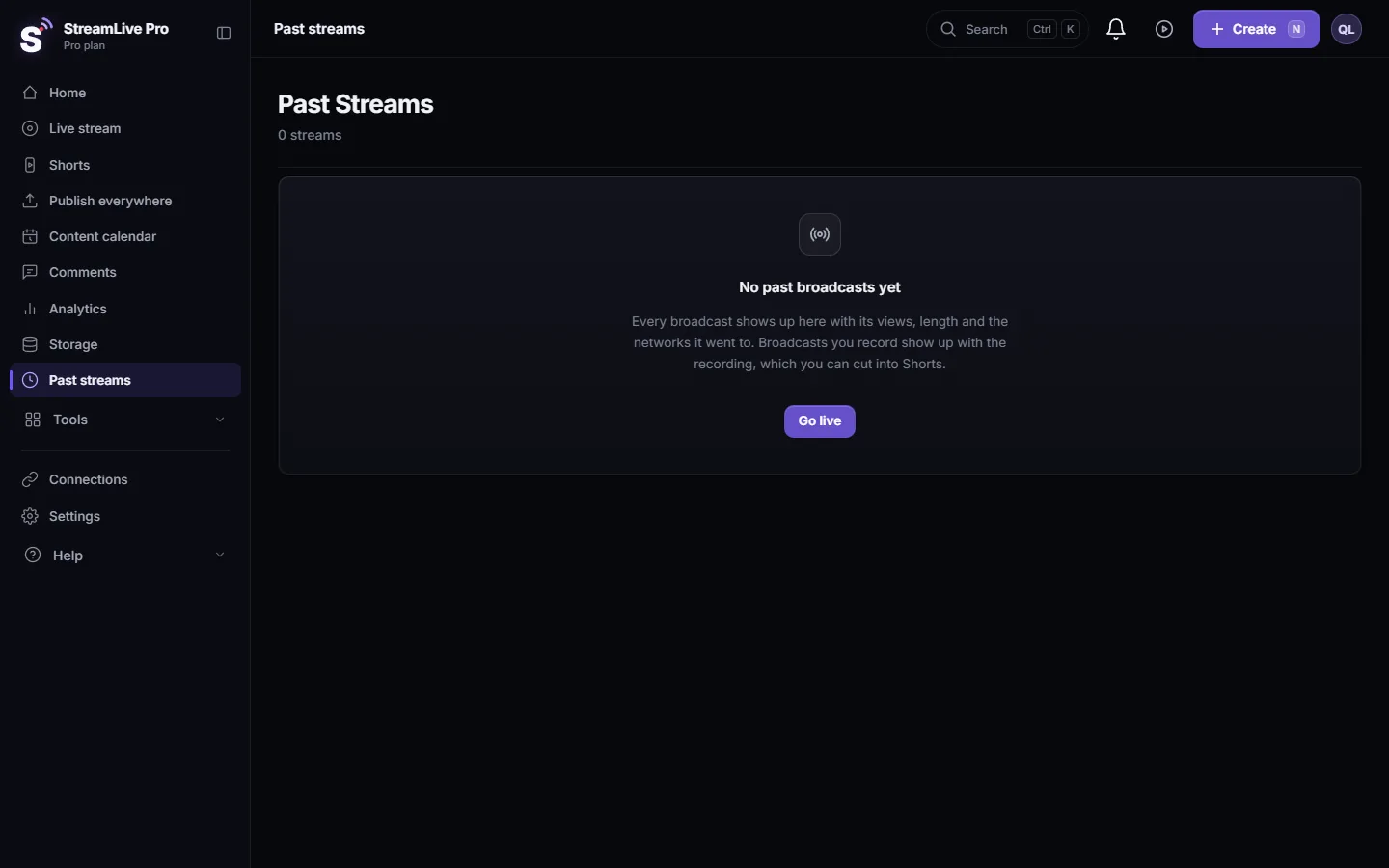
- Open Past streams. In the dashboard menu choose Past streams. Every broadcast has a card, newest first.
- Look at the card. A card with a play button still has video. A card with only the date, the length and the viewer count has no video left.
- Open the card menu. Click the three dots on the card. If there is still video you will see Watch recording, Download recording and Keep recording (else auto-deleted).
- Keep it if it is recent. If the broadcast ended less than about two hours ago and you did not press Record, choose Keep recording now. The video then stays until you delete it and counts toward your storage.
- Check Storage. Choose Storage. Recordings made with the Record button in the browser studio or the podcast studio appear here, next to the files you uploaded.
- Download. A broadcast's recording downloads from its card menu (Download recording). Studio recordings, uploads, Shorts and exports download from Storage.
- Set up the next broadcast. In the browser studio press Record (in the bottom bar, next to Go Live) as soon as you start. A red timer under the picture shows that it is recording.
Why it works this way
Keeping every broadcast would fill your storage with hours of video nobody asked for, so the default is to keep only what you chose. A recording you kept, by pressing Record or from the menu, has no expiry date. It stays until you delete it. More about the storage screen, the 6 GB upload limit and what happens when storage fills up: Recordings and storage — what is kept and for how long.
When you press Record in the browser studio, two things happen. The browser saves its own copy to Storage, and the server marks the broadcast's full video to be kept. If marking the server copy fails twice, the studio says so on screen. In that case the copy in Storage is still being saved, and you can also use Keep recording from the card menu after the broadcast.
Broadcasts sent from OBS, vMix or a hardware encoder have no Record button in our studio. Use Keep recording in the Past streams card menu within about two hours of the end. If you also want a local file, record in your encoder as well.
4K recording is available on Pro and Studio; see /pricing?lang=en.
When to contact support
Write to [email protected] if you pressed Record and the recording is in neither place, or if a recording you kept disappeared. Send the broadcast title, the date and time it started, whether it ran from the browser studio or from an encoder, and a screenshot of the card in Past streams. Do not send your stream key.
Related: Shorts were not created after my live stream, How to create Shorts from any video, no live stream needed, Your first live broadcast, step by step.
Frequently asked questions
I did not press Record. Is the broadcast lost?
Not if less than about two hours have passed. Open Past streams, click the three dots on the card and choose Keep recording. After that window the video is removed and cannot be recovered.
How long is a kept recording stored?
Until you delete it. A recording you chose to keep has no automatic deletion.
Why is the recording of my OBS broadcast not in Storage?
Storage holds the files the browser studio records and the files you upload. A broadcast from an encoder keeps its video on the broadcast card in Past streams, if you kept it.
Does a kept recording use my storage?
Yes. Every kept recording counts toward your plan's storage, which is why recordings are not kept by default.
My browser crashed during the recording. What now?
Sign in again. The recording was sent in pieces while you were live, and a recording with real content is restored in the background without asking you.
Can I get Shorts from a broadcast I did not record?
Automatic Shorts are made within minutes of the end, from the temporary copy, so they usually exist. Making new Shorts from that broadcast later needs the video, which means keeping it within about two hours.
Keep reading
Logo shows in a black box on air? The luma key in the browser studio turns the dark parts transparent. Where the slider is, what value to start with, and its limits.
Which browsers and devices work with StreamLive ProWhich browser to use for StreamLive Pro: Chrome, Edge, Safari or Firefox on a computer, Safari or Chrome on a phone or iPad, and why in-app browsers fail.
Cannot start a second live stream at the same timeCannot start a second live stream? What "one live broadcast at a time" means, how to find the broadcast that is still running, and when a second live helps.
My live stream stopped by itselfYour live stream ended without anyone pressing Stop? The usual causes in order: lost signal, the trial's 60 minutes, an ended plan or an empty picture.
Want to try it? 7-day trial, no credit card.
Start free