 StreamLive Pro
Turn a podcast episode into Shorts with captions
Turn a podcast episode into vertical Shorts: pick the recording in Shorts, get up to 5 captioned clips that follow the speaker, check them and publish to every network.
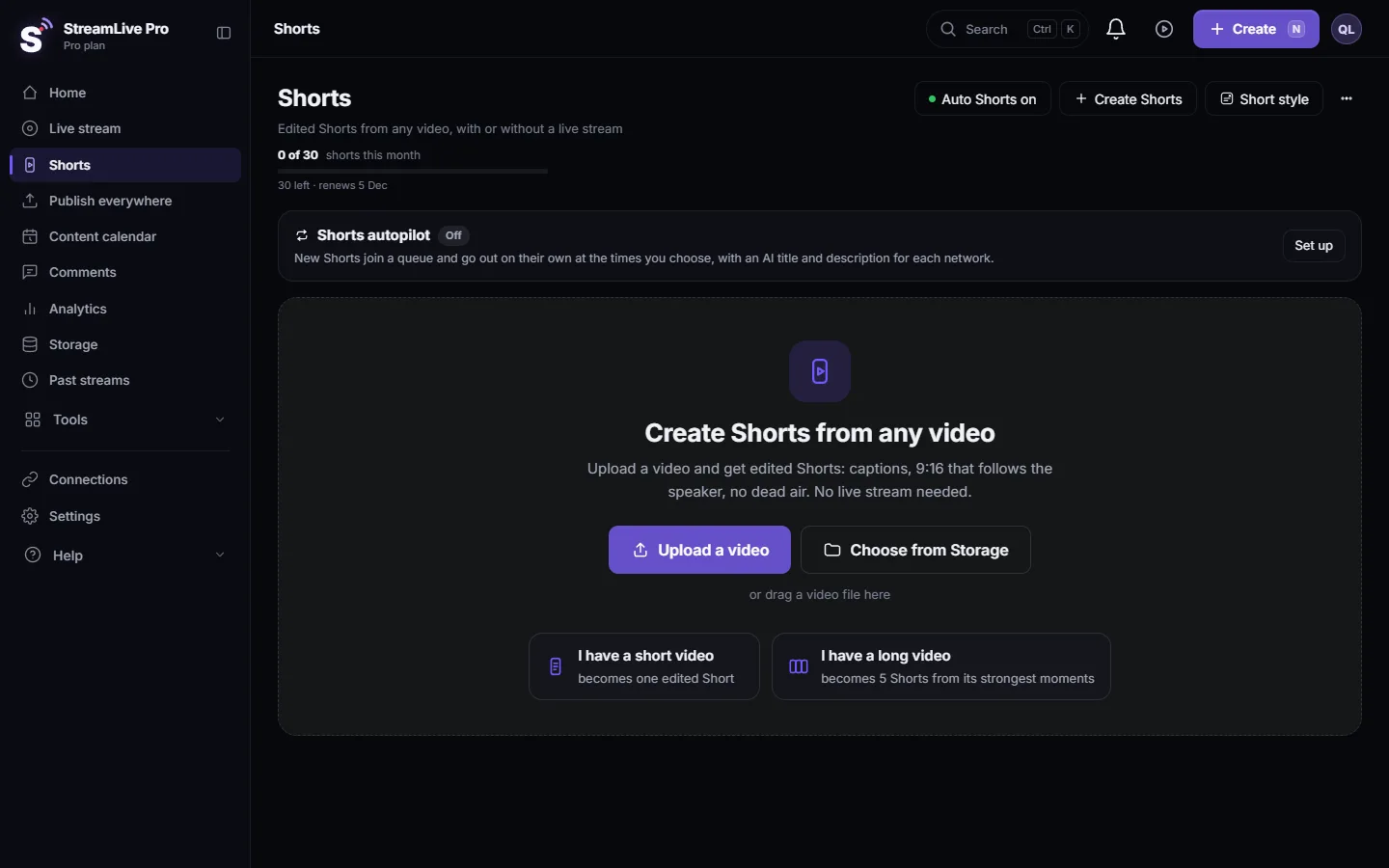
A podcast episode recorded in StreamLive Pro is already a file in Storage, so it can go straight into Shorts. Open Shorts, choose the episode from Storage, and you get up to 5 vertical clips from its strongest moments, each cropped to follow the speaker, with burned-in captions and a thumbnail. You review them, fix what needs fixing, and publish them to your networks now or one a day.
Before you start
- The episode file. A podcast studio recording is saved to Storage when you stop recording. A broadcast that was not recorded is removed about two hours after it ends, so press Record if you want the full episode later.
- Your Shorts allowance. Each Short counts toward the plan's Shorts for the month; see /pricing?lang=en. One video gives up to 5 Shorts.
- How moments are chosen. On every plan a model looks for the strongest moments. On Creator and the trial the candidates come from pauses in the speech; on Pro and Studio a fuller AI selection runs. It can pick a weak moment, so review before you publish.
- Trial Shorts carry a small "Made with StreamLive Pro" mark, and TikTok refuses them for that reason: My Short has a "Made with StreamLive Pro" watermark.
Steps
- Open Shorts. Choose Shorts in the menu and press Create Shorts. Choose the episode from Storage, or upload the file.
- Choose the captions. Pick a caption design; there are more than 80 (Caption templates and styles in depth). Hebrew captions are laid out right to left, with punctuation and numbers on the correct side: Automatic Hebrew captions on Shorts.
- Wait for the Shorts. A long episode becomes up to 5 Shorts. The page shows each step as it works, and the Shorts appear when ready.
- Watch each Short. Check that the clip starts and ends on a full sentence, and that the face stays in the frame.
- Fix what needs fixing. Trim the start or end, correct a word in the captions, or change the design: Edit a Short before you publish it.
- Publish. Publish one Short to the networks you choose, or use the Publish all bar, which schedules one Short a day at your best hour by default: Publish all your Shorts at once.
Podcast-specific advice
- Two people side by side rarely fit one vertical frame. A 9:16 crop from a 16:9 picture keeps about a third of the width, so the crop follows one speaker. Moments where one person talks for a while make the strongest Shorts.
- Use a single-camera file for one guest. In the podcast studio each camera connected to your computer can be recorded to its own file (How to record each camera separately (ISO recording)). Upload that file to Shorts to get clips that stay on one person.
- Speak in complete thoughts. A Short has no context. Answers that start with the question in other words ("The reason we moved to video is...") cut into better clips.
- Leave the lower part of the frame clear. Captions sit there, and the network's buttons cover the right side.
- Shorts after a live are automatic. If the episode was a live, Shorts are cut when it ends unless you turned automatic Shorts off. Do not ask for them twice.
What can go wrong
| Problem | Fix |
|---|---|
| The episode is not in Storage | Recording was not pressed. A live without Record is removed about two hours after it ends |
| The crop shows half of two faces | Use a moment with one speaker, or the separate camera file of that person |
| A clip ends mid-sentence | Trim it in the Short's editor before publishing |
| A name is wrong in the captions | Correct the word in the captions; fix the transcript once if it repeats |
| No Shorts were made | Check the monthly allowance and the troubleshooting page: Shorts were not created after my live stream |
| TikTok refuses a trial Short | The watermark is the reason. See My Short has a "Made with StreamLive Pro" watermark |
More about Shorts in general: How to create Shorts from any video, no live stream needed and Turn a horizontal video into a vertical 9:16 video.
Frequently asked questions
How many Shorts do I get from one podcast episode?
Up to 5 from one video. Each counts toward the plan's monthly Shorts.
Can I make Shorts from an episode I recorded somewhere else?
Yes. Upload the file in Shorts and it is treated like any other video. No live broadcast is needed.
Will the Short follow the person who is talking?
The crop follows the face or movement it finds in each frame. With two people side by side it keeps one of them, so pick moments where one person speaks.
Can the Shorts have Hebrew captions?
Yes. Captions are transcribed word by word and laid out right to left, with punctuation and numbers on the correct side.
Are podcast Shorts posted automatically?
No. You review them and then publish one, or schedule them with Publish all, which spaces them one a day by default.
Keep reading
What is B-roll: cutaway footage laid over a speaker to show what they talk about. A-roll vs B-roll, when it helps a Short, and how StreamLive Pro adds it.
A weekly Torah class online: live, Shorts and a podcastHow to run a weekly Torah class online: a weekday live, scheduling ahead, Shorts with Hebrew captions, translation for students abroad and a podcast episode.
Video podcast setup by budget: one person or twoVideo podcast setup by budget: one person or two, dynamic mics in untreated rooms, camera angles, light, ISO recording, Spotify and Apple video, and Shorts.
Descript alternative: Descript vs StreamLive ProDescript alternative for transcription in Hebrew and more: languages, exports, remote recording, clips and live, from Descript's pages checked November 2026.
Want to try it? 7-day trial, no credit card.
Start free