 StreamLive Pro
How to start streaming games: the complete guide
How to start streaming games on a PC or a console to Twitch, Kick and YouTube: the setup to pick, gear, network rules, a first stream with OBS, and Shorts after.
To start streaming games you need three things: a way to capture the game (OBS on a PC, or a capture card for a console), an account on each network you want to reach, and enough upload speed for one steady stream. StreamLive Pro adds the step that sends that one stream to Twitch, Kick, YouTube and other networks at once, and cuts Shorts from it when you finish. Its free desktop app, StreamLive Pro Studio, has a Gamer mode but is still a 0.5.0 test version that is not downloadable, so today you stream with OBS or with the browser studio.
This is the overview. Each part links to a page with the full steps.
Pick your setup
| You play on | Capture with | How it reaches the networks | Full guide |
|---|---|---|---|
| A PC, demanding games | OBS (or Streamlabs, vMix) | One stream to StreamLive Pro, sent on to every network you tick | How to stream a game to Twitch, Kick and YouTube at once |
| PlayStation, Xbox or Switch | A USB capture card on a computer, in the browser studio | The browser studio sends one stream | Stream a game console to many networks with a capture card |
| A laptop, browser or slower games | Screen share in the browser studio, webcam on top | The browser studio, nothing to install | How to share your screen in a live stream |
| One network only, your own keys | OBS on its own | Straight from OBS to that network | The network's own help |
| An all-in-one free desktop app | StreamLive Pro Studio, Gamer mode | Coming: not downloadable yet | StreamLive Pro Studio: free live production software, Windows and Mac |
Two plan facts decide the first row. Sending from OBS or another encoder is on the paid plans; the 7-day trial uses the browser studio only (No stream key for OBS on the trial). How many networks you reach at once depends on the plan: /pricing?lang=en.
The gear you need
- The computer. OBS runs on Windows 10 and 11, macOS 13 or newer, and Linux (obsproject.com, checked 5 November 2026). Playing and encoding on the same PC works for most games; if the game stutters when you go live, lower the stream's resolution or frame rate before you buy anything.
- A microphone. A headset is enough to start. Viewers forgive a soft picture faster than bad sound.
- A webcam, optional. A face in the corner helps people connect, and it helps your Shorts later.
- A capture card for a console, plugged into the computer. StreamLive Pro does not test or recommend models: Connect an HDMI capture card to the browser studio.
- Upload speed. You send one stream whatever the number of networks, so you need room for one stream plus a margin, not three: Upload speed and bitrate for multistreaming.
What each network asks first
- Twitch. Twitch publishes simulcasting guidelines; read them before you stream to other services at the same time (Twitch simulcasting guidelines, checked 5 November 2026). Connecting Twitch: How to stream to Twitch from your browser.
- Kick. Set a title and a category before you start: How to stream on Kick from your browser.
- YouTube. Live streaming must be enabled on the channel; YouTube asks you to verify the channel and have no live streaming restrictions in the past 90 days (YouTube Help: get started with live streaming, checked 5 November 2026). The first time can take up to 24 hours, so do it a day ahead: How to go live on YouTube from your computer.
- TikTok and Instagram. Live by stream key, and the key changes for each session; paste a fresh one every time: Live on Instagram and TikTok with a stream key.
Steps
These are the short steps for the most common setup, a PC game in OBS sent to three networks. The full version is in How to stream a game to Twitch, Kick and YouTube at once.
- Connect your networks. Open Connections and sign in to Twitch, Kick and YouTube once. Pairs: How to stream to Twitch and Kick at the same time, How to stream to YouTube and Twitch at the same time.
- Build your scene in OBS. The game capture, your webcam, your microphone. Keep it simple for the first stream.
- Create a live for your encoder. In Live stream start a new live, choose Stream from software like OBS (RTMP / SRT) and tick the networks.
- Paste the server and key into OBS. OBS, Settings, Stream, Custom: Connect OBS to StreamLive Pro and multistream.
- Set one bitrate for all networks. Pick one your upload holds with room to spare: OBS settings for multistreaming to several networks.
- Do a ten-minute test. Watch each network on a phone: picture, sound, and whether the game drowns out your voice.
- Go live and keep the StreamLive Pro tab open. When your stream arrives, the open dashboard sends it to the networks you ticked.
- Press Record if you want the full stream kept. Otherwise it is removed about two hours after the end: Where is my live stream recording?.

Console streaming: the short version
The console's HDMI goes into a capture card, the card goes into a USB port on the computer, and in the browser studio you add the card as a camera and pick its audio device so the game sound comes with the picture. Your headset is your own microphone. Some consoles protect their HDMI output and the card then shows black, which the console's settings can change. All of that, with the party chat trap, is in Stream a game console to many networks with a capture card. A black tile or no sound: My capture card shows a black screen or has no sound.

StreamLive Pro Studio Gamer mode (coming)
StreamLive Pro Studio is free, professional streaming software for Windows and Mac. It is not released: today it is a 0.5.0 test version with no public download, and the download will appear on /desktop?lang=en when it is out. Its Gamer mode is built for people who know OBS. In the 0.5.0 test version it has:
- Scenes and sources, with an audio mixer and a Go live button, the way OBS and Streamlabs work. Click a scene and it is on air; Studio mode lets you prepare a scene first.
- Import from OBS or Streamlabs, to bring your scenes over in one step.
- Game capture that follows the game in front, fullscreen or borderless, and keeps it when you alt-tab. Nothing is injected into the game, so it is safe with anti-cheat systems; a game in exclusive fullscreen that stays black should be switched to borderless.
- Presets for gaming platforms, chosen for your computer's encoder and your upload speed.
- Up to 6 separate audio tracks in the recording (game, microphone, voice chat, music), so an editor shows each one on its own.
- A round webcam placed in a bottom corner, clear of the game and inside the vertical frame.
- Going live to several networks with your own stream keys, free. Each output is its own upload from your connection.
An optional StreamLive Pro account adds the cloud: one upload sent to every connected network, a phone as a camera, and the Shorts below. Details and system needs: StreamLive Pro Studio: free live production software, Windows and Mac, StreamLive Pro Studio system requirements: Windows, Mac, GPU. Is it really free: Is StreamLive Pro Studio free? Yes, and what the platform adds.
Chat while you play
The chat panel on the StreamLive Pro live page reads YouTube and Facebook with replies, and Twitch and Kick read only. To answer on Twitch or Kick, keep that network's chat open in its own window or on a second screen: Live chat from YouTube and Facebook in one panel. Read each network's rules before you merge chats on screen.
After the stream: Shorts
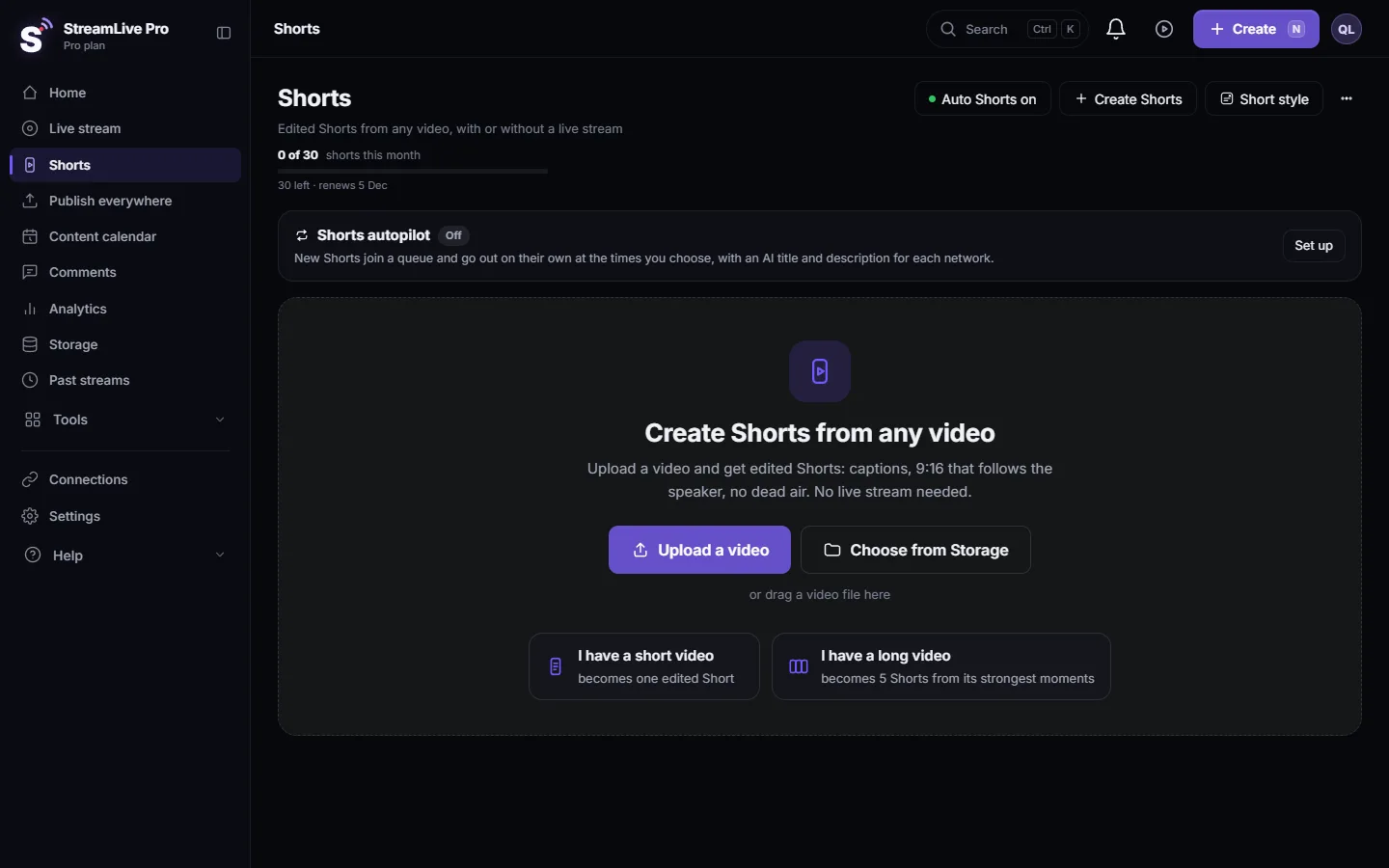
When the stream ends, up to 5 vertical Shorts with captions are cut from it. The moments are found from your speech, so a run where you talk over the game gives better Shorts than a silent one, and a great play without commentary can be missed. Review them on the Shorts page and post them to YouTube Shorts and other networks; TikTok is posted by hand. The full picture: How to turn a live stream into Shorts.
Common mistakes
- Three outputs from OBS through plugins. Each one is another encoder and another full upload. One output to StreamLive Pro is enough: How to multistream with OBS: a plugin or a relay.
- A bitrate the line cannot hold. Dropped frames on every network at once: My live stream drops frames or keeps buffering.
- YouTube live not enabled on a new channel on stream day.
- No title or category on Kick.
- The dashboard tab closed when OBS starts sending.
- The game louder than your voice. Set the levels in the test, not live.
- Waiting for the perfect setup. A headset, OBS and one network is enough for a first stream; add networks when the basics hold.
Where StreamLive Pro fits
StreamLive Pro Studio is free, professional streaming software for Windows and Mac. It goes live to several networks with your own stream keys. A StreamLive Pro account adds the platform: AI Shorts, scheduling, managed lives through your connected networks, and comments, with a 7-day free trial. For gaming that means: OBS or the browser studio captures, StreamLive Pro sends one upload to Twitch, Kick, YouTube and the rest, and the stream comes back as Shorts. It does not replace OBS for game capture today. More: /multistream?lang=en.
Frequently asked questions
What do I need to start streaming games?
A computer that runs the game and OBS, a headset or microphone, and an account on each network. A webcam is optional. For a console you also need a capture card on the computer.
Can I stream to Twitch, Kick and YouTube at the same time?
Yes. Send one stream from OBS or the browser studio to StreamLive Pro and tick the three networks. Read Twitch's simulcasting guidelines before you start.
Can I stream a PS5 or Xbox without a PC?
Not through StreamLive Pro. A console goes through a capture card on a computer and the browser studio. A console's own built-in streaming is set up on the console itself.
Can I use OBS during the free trial?
No. The 7-day trial uses the browser studio only. Sending from OBS or another encoder is on the paid plans.
Is StreamLive Pro Studio available for gaming now?
Not yet. It is a 0.5.0 test version with a Gamer mode, and it is not downloadable. When released it will be free. Until then use OBS or the browser studio with StreamLive Pro.
Will I get Shorts from my gaming streams?
Yes, up to 5 vertical Shorts with captions after each stream. Moments with commentary are picked more reliably than silent gameplay.
Keep reading
StreamLive Pro Studio is free streaming software for Windows and Mac. What the StreamLive Pro platform adds: AI Shorts, scheduling, managed lives and comments.
Live streaming on a Mac without installing softwareGo live from a Mac with nothing to install: the browser studio in Safari or Chrome, the macOS permissions to allow, and when an app is still better.
How to stream a game to Twitch, Kick and YouTube at onceStream a game to Twitch, Kick and YouTube at once: OBS sends one stream, StreamLive Pro sends it on, plus chat, upload, platform rules and Shorts of your best moments.
Live stream checklist: before, during and afterA printable live stream checklist: test broadcasts, stream keys, sound check, backup internet, what to do if the stream drops, and the work after it ends.
Want to try it? 7-day trial, no credit card.
Start free