 StreamLive Pro
Import SRT captions into CapCut (desktop and web)
Import SRT captions into CapCut: make and correct them in StreamLive Pro, download the SRT, and import it on CapCut desktop or web. The phone app cannot.
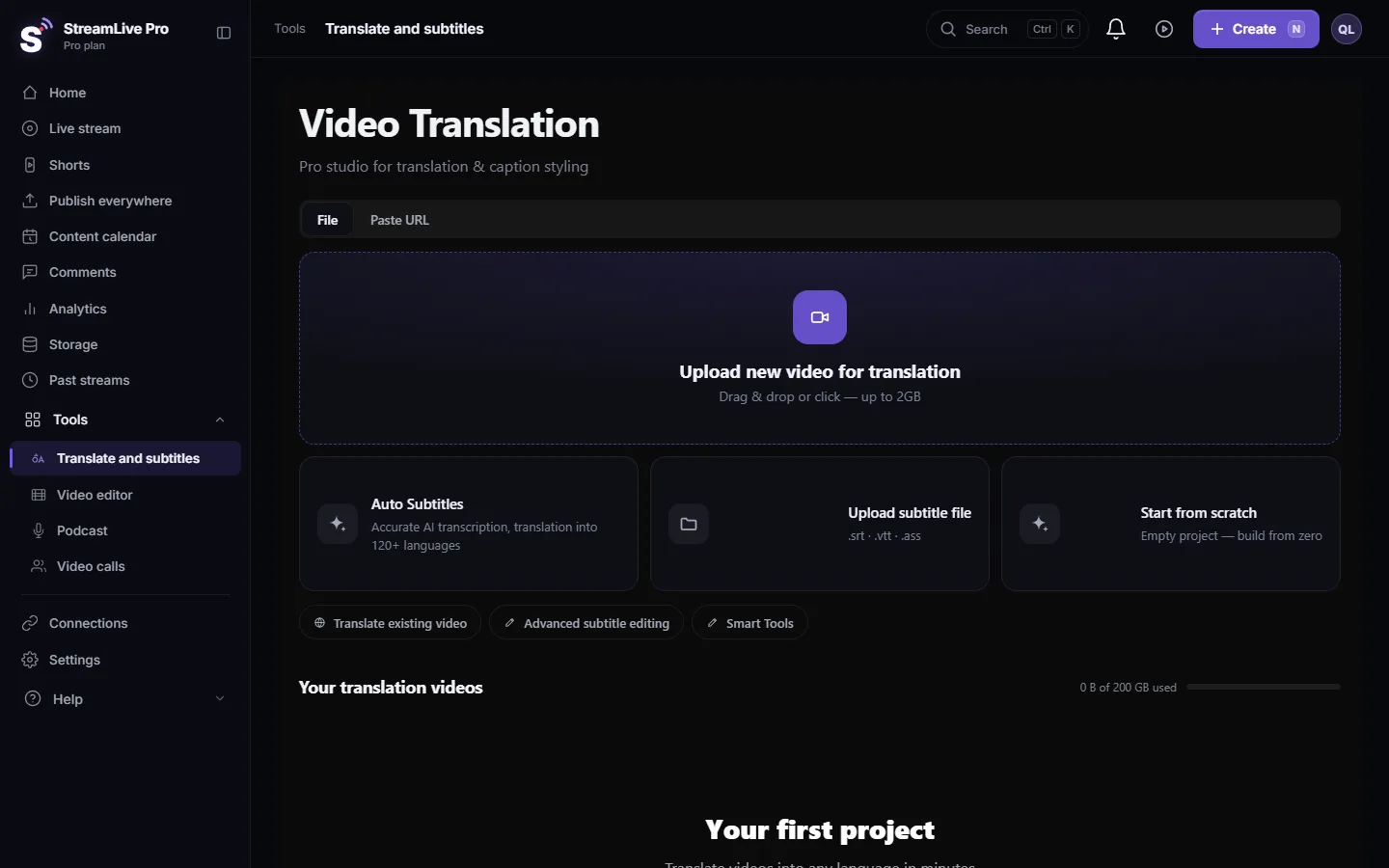
CapCut imports SRT files on its desktop app and on CapCut Web; its own help page says the phone app does not import caption files. So the route is: make the captions in Translate and subtitles, correct them, download SRT — Subtitles, and import the file in CapCut on a computer. Each caption becomes an editable text block on the timeline.
Before you start
- CapCut desktop or CapCut Web. CapCut's article lists the steps for both and says mobile import is not supported (How do I import subtitles?). If you edit on a phone, either finish captions on a computer first or burn them in StreamLive Pro.
- Final cut first. Captions are timed to the file you upload to StreamLive Pro. If you will trim in CapCut afterwards, captions after each cut move out of place.
- Minutes. Transcription uses the plan's translation minutes, shown per plan on the /pricing?lang=en. The trial includes 10 minutes, for videos up to 10 minutes long.
Steps
- Upload the video. Open Translate and subtitles and press Upload new video for translation.
- Choose languages. Pick the spoken language under Source language and the caption language under Target language (the same language for a transcript). Press Start translation.
- Correct the text. In Subtitles, fix names and terms. Short vertical videos read better with short lines: split long ones here.
- Download the SRT. Press Export and choose SRT — Subtitles.
- Import on CapCut desktop. Open the project, go to the Captions area, choose to add captions and import the file. CapCut's page names the exact buttons, which CapCut can change between versions.
- Or import on CapCut Web. Open the project, go to the captions tab and upload the caption file (CapCut Web takes .srt).
- Style once for all. Select a caption, set font and size, and apply it to all captions with CapCut's apply-to-all option. Choose a font that has Hebrew letters before anything else.
- Check the right-to-left lines. Play lines that end in punctuation, lines with numbers and lines with an English word, in CapCut's player and in the exported file.
Hebrew in CapCut: what to check
Our SRT begins each Hebrew or Arabic line with an invisible right-to-left mark so punctuation stays on the correct side in players that follow the standard. Once CapCut turns the lines into its own text blocks, the layout is CapCut's. We have not tested every CapCut version, so check:
- Punctuation. A question mark or full stop should sit at the left end of a Hebrew line.
- Numbers and English words inside a Hebrew line should stay where they were said.
- Font. A font with no Hebrew letters shows empty boxes or another face.
- Line breaks. On a narrow vertical frame a long line wraps; the first half of the sentence must be on top.
If CapCut keeps reversing a line that is right in our editor, burn the captions in StreamLive Pro (MP4 — Burned-in subtitles) and import the finished video into CapCut. The burned render fixes direction in the picture. The cost is that the text can no longer be edited in CapCut.
Skip CapCut for Shorts
If the job is vertical Shorts from a longer video or a live, StreamLive Pro already cuts them, frames them to 9:16 and burns in captions in a design you choose. See Automatic Hebrew captions on Shorts and Edit a Short before you publish it.
What can go wrong
- The import button is missing. You are on the phone app; CapCut says mobile cannot import caption files. Use desktop or web.
- "Cannot parse" or nothing happens. The file was re-saved in another encoding or edited by hand. Download it again; CapCut asks for UTF-8.
- Captions run late after a trim. You trimmed in CapCut after captioning. Move the affected blocks, or trim first and caption the final cut; see Captions out of sync.
- Boxes instead of letters. The CapCut font has no Hebrew. Pick another one.
Frequently asked questions
Can I import an SRT file into CapCut on my phone?
CapCut's help page says the mobile app does not import SRT or TXT caption files. Import on CapCut desktop or CapCut Web, or burn the captions in StreamLive Pro.
Which format does CapCut accept?
CapCut's page lists SRT, which StreamLive Pro exports, and on desktop also TXT with timecodes. Use SRT.
Will my StreamLive Pro caption design come into CapCut?
No. SRT carries text and timing only. Style in CapCut, or burn the design in StreamLive Pro and import the video.
Can I translate captions before importing them?
Yes. Choose another target language in StreamLive Pro, correct the result and download that SRT. Each language is its own file.
Why are some Hebrew lines reversed in CapCut?
CapCut lays out the text once it becomes its own blocks. Check punctuation and numbers; if a line stays wrong, use burned-in captions.
Keep reading
Open vs closed captions: burned into the picture or sent as a file the viewer can switch off. What each is good for, which networks take which, and how to make both.
A weekly Torah class online: live, Shorts and a podcastHow to run a weekly Torah class online: a weekday live, scheduling ahead, Shorts with Hebrew captions, translation for students abroad and a podcast episode.
How to translate video subtitles into other languagesTranscription vs translation vs dubbing, SRT vs VTT vs burned-in, a workflow that stops errors multiplying, Netflix line-length rules and Hebrew RTL.
Burn captions into a video (hardcoded subtitles)Burn captions into a video in StreamLive Pro: correct the text, pick one of more than 80 designs, and render an MP4 with the captions drawn into the picture.
Want to try it? 7-day trial, no credit card.
Start free