 StreamLive Pro
 vs StreamYard: an honest comparison (November 2026)
Both are browser studios with guests and multistreaming. Here is what each plan costs, what it includes and where each one is the better pick, with a source for every number.
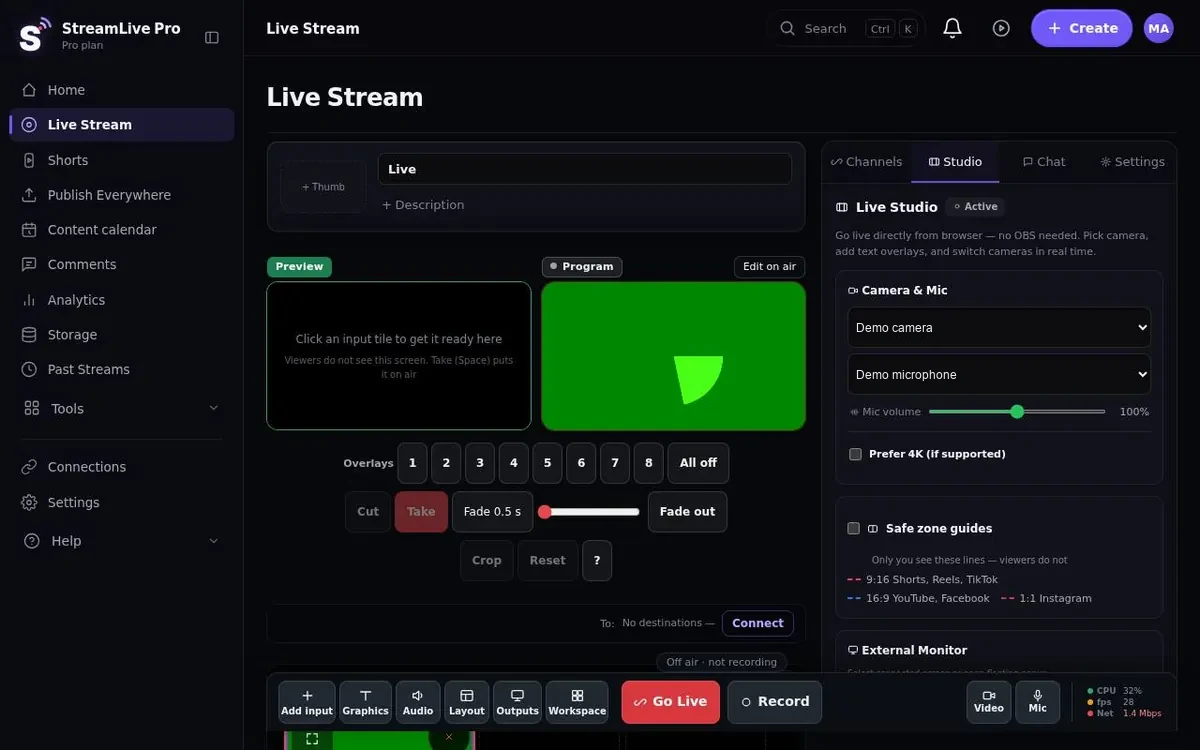
StreamYard and StreamLive Pro both put a live studio in a browser tab: no install, guests join by link, and the stream goes out to several networks at once. When you choose between them, narrower questions help more than "which is better": How many destinations does each plan allow, what does the cheapest useful plan cost, and what happens to the recording after you press End? This page answers those with the numbers each company publishes. Here the recording is kept if you pressed Record; otherwise it is removed about two hours after the broadcast, and the Shorts have already been cut from it. The longer narrative is in our guide A StreamYard alternative with an editor behind it.
The facts, side by side (checked 4 November 2026)
| StreamYard | StreamLive Pro | |
|---|---|---|
| Free plan | Yes, $0: 6 on-screen participants, 2 hours a month of local recordings | No free plan. 7-day trial, no credit card, does not turn into a paid plan by itself |
| Entry plan | Essential, $18.99 a month ($14.99 billed yearly): 2 destinations | Creator, $29 a month |
| Middle plan | Core, $44.99 a month ($35.99 yearly): 3 destinations, 10 on-screen participants, unlimited local recordings, AI clips | Pro, $85 a month |
| Top listed plan | Advanced, $88.99 a month ($68.99 yearly): 8 destinations, 15 backstage, 4K local recordings, transcript download | Studio, $199 a month. Enterprise: by arrangement |
| Destinations at once | 2, 3 or 8 on the paid plans above | 3, 6 or 20, by plan |
| Participants | On screen: 6 on Free, 10 from Core | Guests in the live studio: 4, 15 or 15, by plan |
| Annual billing | Lower monthly price when billed yearly (see above) | Two months free |
| Short vertical clips | AI clips listed from Core | 10, 30 or 300 Shorts a month on every plan, with captions |
| Captions and Hebrew | Not stated on the pricing page | Every word time-stamped; Hebrew right to left; more than 80 caption designs |
| Caption translation | Not stated on the pricing page | 143 languages; 120, 500 or 1,500 minutes a month |
| 4K recording | Local recordings in 4K on Advanced | 4K cloud recording on Pro and Studio |
| Phone | iOS app for guests | Phone browser today (apps coming to the App Store and Google Play); phone as an extra camera |
Source: StreamYard pricing, StreamYard help: iOS app, StreamLive Pro pricing. Checked 4 November 2026.
How we checked: we read StreamYard's pricing page and its help article on the iOS app on 4 November 2026. Our column comes from our live billing data. Where StreamYard's pricing page does not mention something, the table says "not stated" rather than "no": the feature may exist somewhere we did not look. We did not run test broadcasts on StreamYard for this page.
StreamYard's page says its prices can vary with promotions. Prices change. StreamYard and we both adjust plans, so open both pricing pages before you decide. If a number here no longer matches, trust the vendor page.
Where StreamYard is the better choice
- You want a free plan. StreamYard has one, with 6 people on screen. We have a 7-day trial and then a paid plan.
- You want the cheapest entry. Essential is $14.99 a month billed yearly. Compare that with our Creator price above.
- You care most about a polished studio. StreamYard is built around its browser studio. If that is all you need, you pay for nothing else.
- Your guests are on iPhones. StreamYard has an iOS app for guests. Our iPhone and Android apps are coming to the App Store and Google Play; today a phone joins through its browser.
- Your show is about the conversation, not the clips. If you never cut Shorts, never caption in Hebrew and never translate, the parts we add are things you would pay for and not use.
Where StreamLive Pro is the better choice
- Shorts on the entry plan. StreamYard lists AI clips from Core at $35.99 to $44.99 a month. Every StreamLive Pro plan includes 10, 30 or 300 Shorts a month. When the broadcast ends they are cut in 9:16, reframed to follow whoever is speaking, with captions and a thumbnail. You can also make them from any uploaded video, no live needed. The AI chooses the moments and can choose badly, so review before publishing.
- Hebrew captions done properly. Right-to-left text with punctuation and numbers on the correct side, even with the highlighted-word animation. More than 80 caption designs, burned in or exported as SRT or VTT. StreamYard's pricing page does not say anything about Hebrew captions.
- Translation. Captions translated into 143 languages, whole sentences at a time. Not during the live broadcast: live captions and live translation are still in development, and there is no dubbing.
- More destinations at the top. Our plans allow 3, 6 or 20 destinations at once, and the top one goes beyond the 8 of StreamYard Advanced.
- One studio, then the rest of the work. A recording you kept opens in a multi-track editor; finished videos can be published to your connected networks now or on a schedule; and on Pro and Studio a video sent into a connected WhatsApp or Telegram group can be published everywhere.
- Bring your own encoder. On a paid plan, OBS, vMix or Streamlabs can send RTMP, RTMPS or SRT to a StreamLive Pro address and key. See using OBS or vMix.
The studios, feature by feature
Our browser studio has what you would expect plus a few things a production person will notice: several cameras with Preview and Take, a phone as an extra camera, screen share, green screen with an eyedropper, a virtual background, 8 overlay channels, lower thirds and a news ticker, mix-minus so a guest does not hear their own delay, safe-frame guides for 16:9, 9:16 and 1:1, and a whole studio setup saved and restored in one click. A 10-second camera check runs before you go live. On Pro and Studio, the automatic director can switch the picture to whoever is speaking.
What we have not checked: StreamYard's equivalent of each of these. Its pricing page lists participants, destinations and recordings, not studio controls, so we are not claiming it lacks them.
A worked price example
Say you stream a weekly show to YouTube, Facebook and Instagram and want short clips from each episode. On StreamYard, 3 destinations and AI clips both appear first on Core: $44.99 a month, or $35.99 billed yearly. Here that is Creator at $29 a month, with the smallest Shorts limit of 10, 30 or 300 a month. Core allows more people on screen, so check the participants row in the table if you have many guests. If the show is in Hebrew and you want captions, StreamYard's pricing page does not tell you whether that is covered, so test it before you pay. If you only need 2 destinations and no clips, StreamYard Essential is likely the cheaper answer.
Moving from StreamYard
Run both side by side for a week. Connect your channels (connect your channels), invite your usual guest by link (guests and invitations), and do one real broadcast in the trial. The trial allows up to 2 destinations and 2 lives of up to 60 minutes, and 10 Shorts with a small watermark. Then look at the Shorts that came out of it and decide.

No credit card. The trial never turns into a paid plan by itself.
Start a 7-day trialMore on the same subject: the browser studio, AI Shorts, StreamLive Pro vs Restream, and the comparison hub.
Frequently asked questions
Is there a free StreamYard alternative on StreamLive Pro?
No. We offer a 7-day trial with no credit card that does not turn into a paid plan by itself. StreamYard has a free plan, and if price is the only factor it is the cheaper option.
Does StreamYard have Hebrew captions?
StreamYard's pricing page says nothing about captions or Hebrew (checked 4 November 2026). We did not check further, so if it matters to you, ask them directly.
Which is cheaper for three networks with short clips?
On StreamYard, 3 destinations and AI clips both start on Core, $35.99 to $44.99 a month. StreamLive Pro includes Shorts on every plan; compare the price of our plan that covers 3 destinations on the pricing page.
Can guests join from a phone?
Yes, through the phone browser with an invite link. Our iPhone and Android apps are coming to the stores. StreamYard has an iOS app for guests today.
Do viewers see captions during the live stream?
Not yet; it is in development. Today captions and translation are made from the recording and the Shorts after the broadcast, and there is no dubbing.