 StreamLive Pro
Coming soonVersion 0.5.0Desktop app for Windows and Macעברית
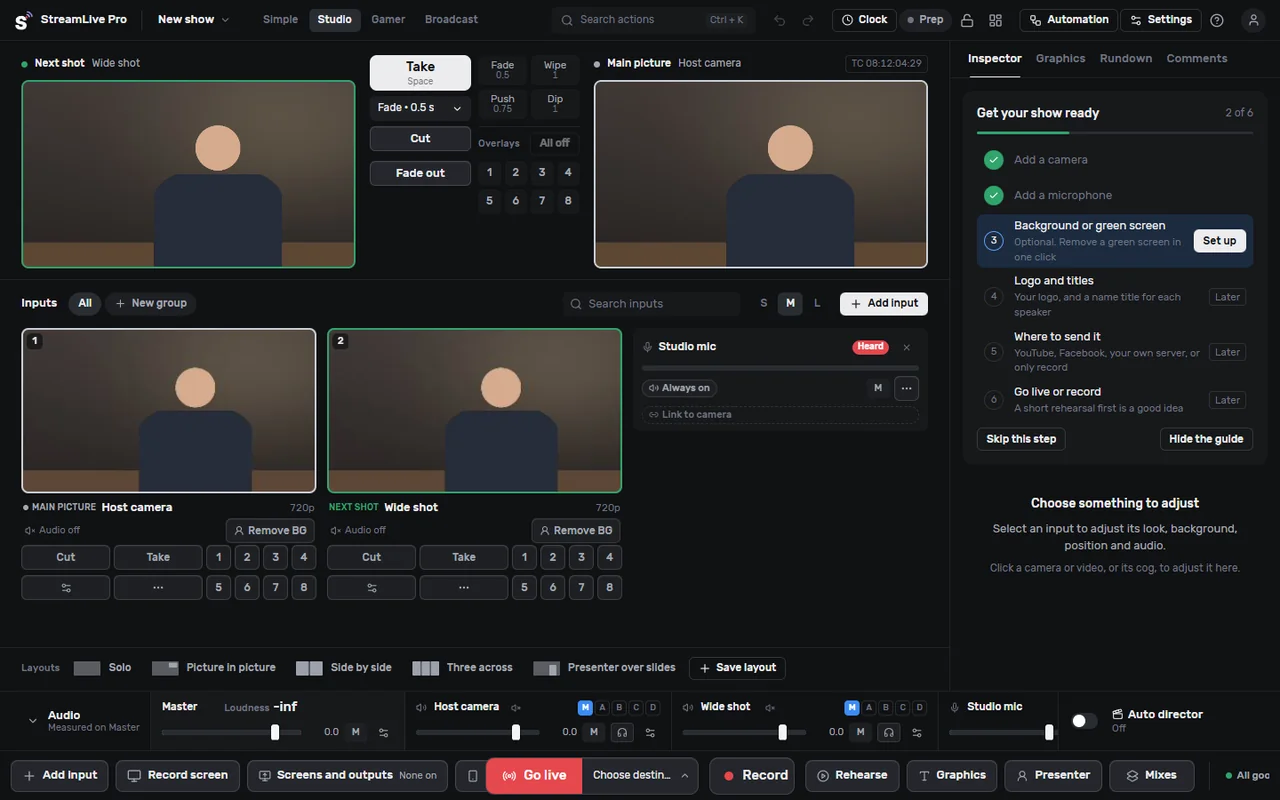
StreamLive Pro Studio
A live production studio on your own computer. Free.
Switch between cameras, add titles, record every camera to its own file and go live, from one window. Built for Windows and macOS on an engine that runs on the graphics card, by the team behind the StreamLive Pro web studio.
Download
Signed installers are on the way. We do not publish test builds that Windows or macOS would warn you about. When it is out, you download it here after a free sign-up with Google or email, so sign up now and you are ready on the day.
What is in 0.5.0
Each of these was built and tested for this version. Where something is not on yet, it says so.
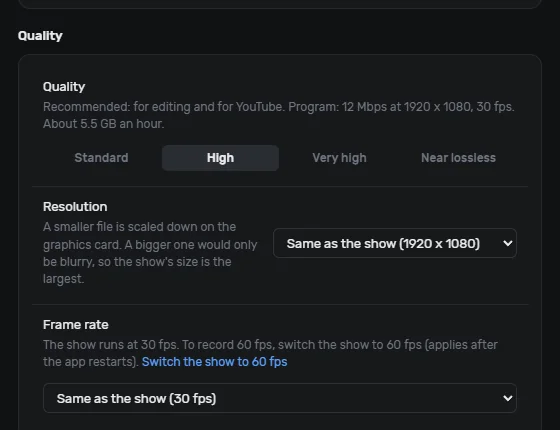
Recording quality in plain choices
Standard, High, Very high or Near lossless. Each choice shows its bitrate and how many GB an hour it takes. Pick the resolution and 30 or 60 frames per second. The graphics card does the encoding (NVIDIA, AMD, Intel or Apple) and the processor takes over by itself if it has to.
Saved on your computer
Recordings stay in a folder you choose and nothing is uploaded. The app shows how many hours are left on the disk. The program and every camera can each get their own file, with sound, in a format that survives a power cut (MP4, or MKV with an MP4 copy made when you stop).
PTZ camera control
Finds IP, NDI and PTZ cameras on your network. Pan, tilt and zoom, and saved positions you recall in one click. Works with VISCA over IP, Panasonic and ONVIF cameras; tested on a Panasonic AW-HE40 and VISCA studio cameras.
Every channel of a sound card
Each input of an audio interface can be its own source with its own meter (tested with an 8-input Focusrite). Taking all channels at once is only done after you agree, because then other programs cannot use the card.
Noise suppression
An AI model that runs on your computer (RNNoise) keeps the voice and takes out fans, hum and room noise. Turn it on per microphone and set its strength. It adds about 10 ms of delay.
Picture and sound sync test
Point the camera at the screen: it flashes and beeps once a second for 10 seconds, the app measures how far apart the picture and sound arrive, and suggests the delay to fix it. One click applies it.
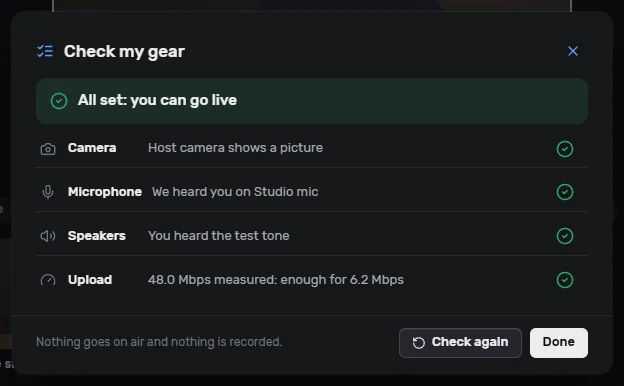
Check my gear
One click checks the camera, the microphone, the speakers and your upload speed, and says in plain words what to fix. Nothing goes on air and nothing is recorded.
Plain words
Simple and Studio modes say "Main picture", "Next shot" and "Volume". The professional terms (PGM, PVW, LUFS) are in the tooltips and in Broadcast mode. Hebrew and English, with a full right-to-left layout.
Remote guests (switched off in 0.5.0)
A link per guest, a waiting room with a camera and microphone check, and Admit in one click. Built, but off in this version until it is tested with guests outside the studio network. How it will work.
Measured: a 30-minute recording of the program plus every camera dropped 0 frames on Windows and on the Mac (October 2026). Version 0.5.0 passes 514 automated engine tests.
Already in the app
- Preview and Program with Take, Cut, transitions and a T-bar
- 8 overlay channels, layouts and picture in picture
- Titles and lower thirds in Hebrew, English and Arabic
- Green screen on any input
- An audio mixer with loudness metering
- An automatic director that cuts to whoever speaks (off by default)
- Go live with a stream key: paste it, the app checks it, the destination turns on
- Several networks at once with your own stream keys or custom RTMP / SRT outputs, free (each one is its own upload)
- Multiview on any screen
- Gamer mode: scenes and sources, like OBS. Click a scene and it is on air
Not ready yet
- A public download: waiting for signed installers.
- The Mac build of 0.5.0 is still being tested on a Mac.
- Remote guests: built, switched off in this version.
- Captions and translation during a live broadcast.
System requirements
Windows
- Windows 10 or 11, 64-bit
- A graphics card with DirectX 12 (NVIDIA, AMD or Intel)
- Tested on Windows 11 with an NVIDIA RTX card
Mac
- macOS 13 (Ventura) or later
- Tested on a Mac with Apple silicon (M-series)
- Intel Macs: not tested yet
Recording several cameras at once needs a fast drive with free space: the app shows how many hours are left. Recording and switching work on the computer itself; signing in and going live need the internet.
StreamLive Pro Studio is free, professional streaming software: everything in it works for free, including going live to several networks with your own stream keys. It does not replace the StreamLive Pro platform. A StreamLive Pro subscription, or the 7-day free trial with no card, adds the platform: AI Shorts cut from your lives, scheduling, managed lives through your connected networks with one upload, and comments.
Until it is out
The StreamLive Pro web studio already runs in any browser on a Mac or a PC: going live to many networks, podcasts with remote guests, a phone as a camera and automatic Shorts. If you use vMix or OBS today, keep them and send their output to StreamLive Pro.
Questions
Is StreamLive Pro Studio free?
Yes. It is free, professional streaming software, and it goes live to several networks at once with your own stream keys.
Does the Studio replace the StreamLive Pro platform?
No. The Studio produces and sends the live. The StreamLive Pro platform adds AI Shorts cut from your lives, scheduling, managed lives through your connected networks with one upload, and comments, in your account on the website.
When can I download it?
When the signed installers are ready. Until then the buttons on this page say "Coming soon", and on the day they work this page shows the download links.
Why not publish the test build now?
An unsigned build makes Windows and macOS show a warning before it opens. We would rather you never see that from us.
Where are my recordings saved?
Only on your computer, in a folder you choose. Nothing is uploaded unless you send it yourself.
Does it work with PTZ cameras?
Yes, VISCA over IP, Panasonic and ONVIF cameras: move, zoom and saved positions. It was tested on real studio cameras.
Can I bring remote guests in?
Not in 0.5.0: remote guests are built but switched off. Use the web studio for guests today, or add a phone as a network camera.
Is the interface in Hebrew?
Yes. English and Hebrew, with a full right-to-left layout.
Do I have to leave vMix or OBS?
No. You can keep them and send their output to StreamLive Pro, or move to the Studio when you are ready.
vMix, OBS and other product names are trademarks of their owners. StreamLive Pro is not affiliated with them.