 StreamLive Pro
Podcast recording app: record a video podcast with guests
A podcast recording app for video: record in the browser with remote guests and phone cameras, go live at the same time, publish by RSS and cut Shorts.
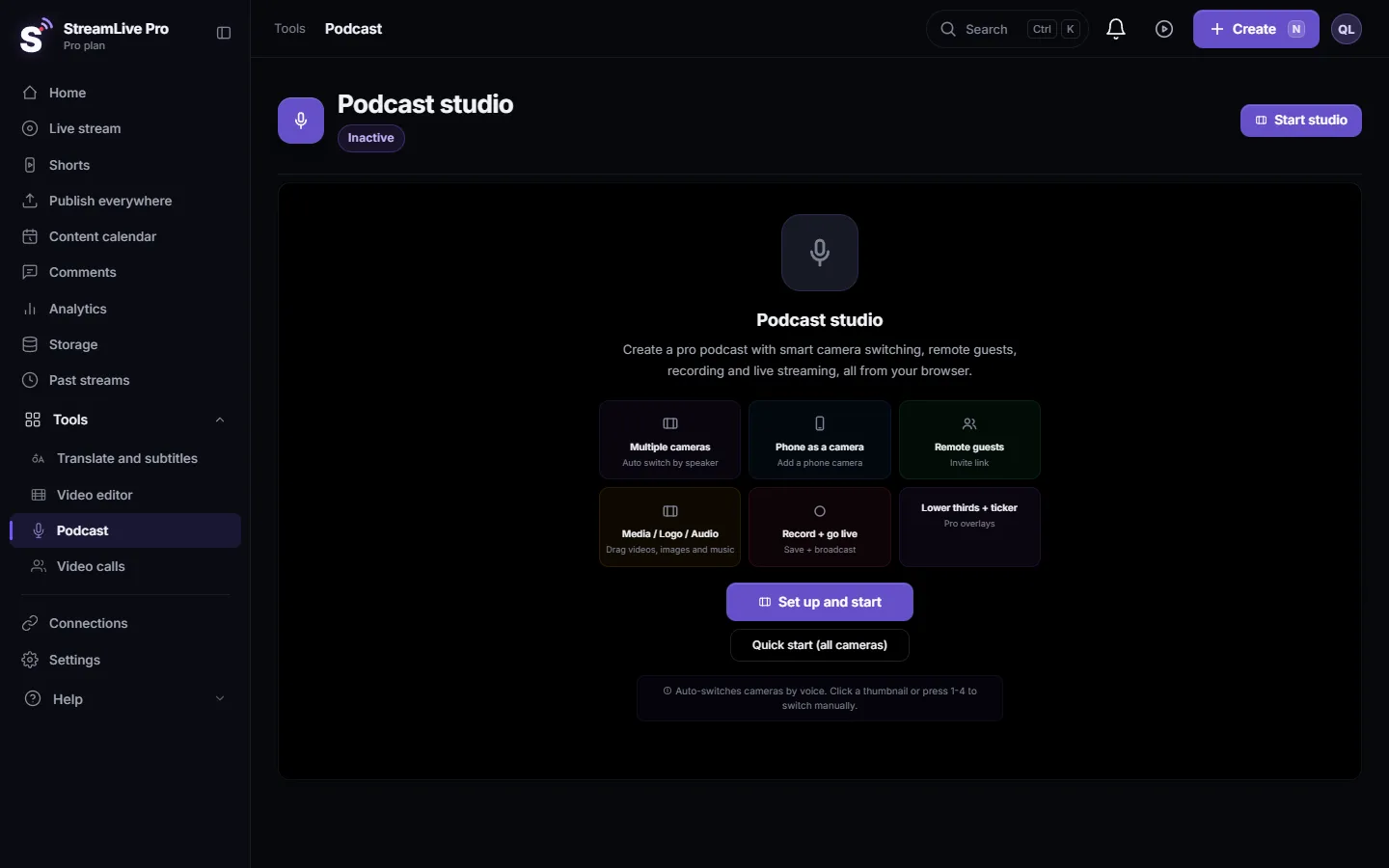
StreamLive Pro records video podcasts in a podcast studio that runs in the browser on a computer: you pick your cameras and microphones, invite remote guests with a link, add phones as extra cameras, and press Record, Go Live or both. Each local camera can also be recorded to its own file. There is nothing to install today; StreamLive Pro Studio, the desktop app, is coming and is not released.
"Podcast recording app" can mean three different things: an app on the phone, a program on the computer, or a studio in the browser. This guide sorts them out, shows what to pick for one person, two people in a room, and a remote guest, and walks through a first recording.
Three kinds of podcast recording app
| Kind | Good for | Watch out for |
|---|---|---|
| A phone app | Audio notes, a quick solo episode | One camera, one microphone, hard to bring a guest in |
| Desktop software | Full control, local files at full quality | Installing, learning, and a separate tool for remote guests |
| A browser studio | Guests by link, several cameras, record and live together, nothing to install | Needs a steady connection for remote guests |
For most video podcasts with two or more people, the browser studio is the shortest path from "we want to record" to a finished episode. A phone is still useful, as a second camera or as the way a guest joins.
What you need for each setup
| Setup | Cameras | Microphones | In StreamLive Pro |
|---|---|---|---|
| One person | A webcam, or a phone as the camera | One USB microphone | Podcast studio with one camera |
| Two people in one room | A camera per person, or a phone for the second angle | One microphone per person | Automatic camera switching follows who speaks (not on Creator) |
| Host plus a remote guest | Your camera; the guest's own camera | Yours, and headphones for the guest | Invite by link; the guest joins from a computer or a phone browser |
One microphone per person matters twice: the sound is cleaner, and automatic camera switching listens to each microphone to know who is talking. Gear by budget: Video podcast setup by budget: one person or two.
Record your first episode
- Open the podcast studio. Choose Podcast in the menu and click Start studio.
- Pick cameras and microphones. Tick the ones you want in Studio Setup. USB capture cards appear as cameras too. To use an audio interface with several inputs, see Use an audio interface in the podcast studio.
- Add a phone as a camera if you want a second angle. Use the Phone tile and open the link or scan the code on the phone. It works in the phone browser, no app needed: Use your phone as an extra camera.
- Invite the guest. Click Invite and send the link. The guest joins from a computer or from the phone browser; they can join with camera and microphone, camera only, microphone only, or just listen. See How to invite a guest to your podcast recording.
- Link each microphone to its camera in the Auto Switch panel, and turn Auto Mode on if your plan includes it.
- Record. Press Record. To also stream the episode live, press Go Live; the two are independent. See Record a podcast and go live at the same time.
- Stop and find the file. Stop recording when you finish. The recording is converted to MP4 and saved to Storage. Press Record before Go Live so the file includes the opening.
Separate files for editing
The program recording is the mixed show as viewers saw it. If you want to edit angles later, the podcast studio can record each local camera to its own file as well: How to record each camera separately (ISO recording). Remote guests are part of the main recording, not a separate file per guest. If separate high-quality files from every remote guest are the main thing you need, compare A Riverside.fm alternative when the episode also goes out live before you choose.
After the recording
- Publish the episode. StreamLive Pro hosts a podcast RSS feed that you submit once to Spotify and Apple Podcasts; a public feed is on the paid plans. See Publish your podcast to Spotify and Apple Podcasts.
- Cut Shorts. Vertical, captioned Shorts from the episode, with the frame following the speaker: Turn a podcast episode into Shorts with captions.
- Captions and translation. Transcribe the episode and translate the captions into other languages from Translate and subtitles.
Common mistakes
- One microphone on the table for two people. Automatic switching cannot tell who is talking, and you cannot fix one voice without the other.
- A guest without headphones. Their speakers leak back into their microphone and you hear an echo.
- Opening the guest link inside the Facebook or Instagram built-in browser. The camera often does not work there. Ask the guest to open it in Safari or Chrome.
- Not saving the setup. Save the studio configuration so next week's episode starts with the same cameras and layout: Save your podcast studio setup for the next episode.
- Forgetting the plan limits. How many people the room holds and whether automatic switching is included depend on the plan; the trial records two podcasts of up to 60 minutes. See pricing.
StreamLive Pro Studio, coming
StreamLive Pro Studio is our desktop app for Windows and Mac. It is not released and has no date. The 0.5.0 test version records every camera to its own file (MP4 or MKV), takes every channel of an audio interface as its own source, and has RNNoise noise suppression and a picture and sound sync test. Remote guests are built but switched off in that version. When it is released it is free to download and use, recording included; a StreamLive Pro account adds the platform, including podcast publishing, AI Shorts and scheduling, with a 7-day free trial. See StreamLive Pro Studio: free live production software, Windows and Mac.
Frequently asked questions
Can I record a podcast on my phone with StreamLive Pro?
The phone works as a camera for the podcast studio on a computer, or as the way a guest joins, both in the phone browser. The podcast studio itself runs on a computer.
Can a guest join the podcast from a phone?
Yes. The guest opens the invite link in Safari or Chrome on the phone and joins with camera and microphone, camera only, microphone only, or as a listener.
Does StreamLive Pro record each camera separately?
Yes, each local camera can be recorded to its own file next to the program. Remote guests are part of the main recording.
Can I record and go live at the same time?
Yes. Record and Go Live are separate buttons, so you can do one, the other, or both.
How do I get the podcast onto Spotify and Apple Podcasts?
StreamLive Pro hosts the RSS feed. You submit the feed address to Spotify and Apple Podcasts once, and new episodes reach them from the feed. A public feed needs a paid plan.
Keep reading
Switcher Studio alternative for multicamera live streams with phones: devices, destinations, guests, hosting and Shorts, from Switcher's pages checked November 2026.
Echo cancellation and noise suppression explainedEcho cancellation removes your speakers from your microphone; noise suppression removes background sound. What each does, its limits, and the StreamLive Pro settings.
How to live stream a panel discussionHow to live stream a panel discussion with remote speakers: invites, layouts for three to five people, a moderator's run sheet, audience questions on screen, and Shorts.
How to live stream a cooking show with two camerasHow to live stream a cooking show with two cameras: a phone overhead on the pan, the cook's face, picture in picture, sound in a noisy kitchen, and Shorts of each recipe.
Want to try it? 7-day trial, no credit card.
Start free