 StreamLive Pro
PTZ camera live streaming, and what works today
PTZ control lives in our desktop app, StreamLive Pro Studio 0.5.0, coming soon. Until then, OBS or vMix with your PTZ cameras sends one stream to us and we deliver it to every network.
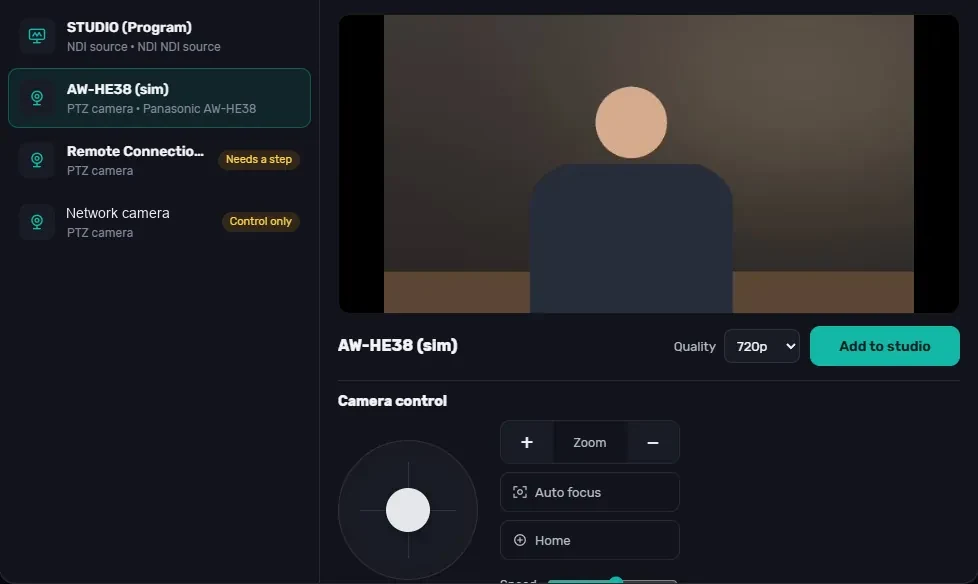
The short version first: PTZ camera control in StreamLive Pro lives in our desktop app, StreamLive Pro Studio 0.5.0, and that app is not downloadable yet. It is coming soon; we are waiting for signed installers, and the Mac build is still being tested. If you need to stream with PTZ cameras this week, skip to "What to do today". If you are planning a setup for the coming months, or looking for a vMix alternative for Mac, read on.
What a PTZ setup needs
A PTZ (pan, tilt, zoom) camera is moved by remote control: one operator can cover a stage, a lectern and an audience from a desk, using saved positions. A typical live setup has three parts:
- Control: software or a joystick that moves the camera and recalls saved positions.
- Video in: the camera's picture reaches the computer over the network (NDI or another IP stream) or over HDMI/SDI through a capture card.
- Switching and output: a vision mixer that cuts between cameras and sends the program out as a stream.
vMix and OBS handle switching and output; PTZ control in them depends on the camera and the setup. StreamLive Pro Studio is built to do all three in one app, then hand the stream to our cloud for delivery to many networks.
PTZ control in StreamLive Pro Studio 0.5.0
- Protocols: VISCA over IP, Panasonic, and ONVIF.
- Controls: pan, tilt and zoom, and saved positions you recall with one click.
- Tested on: a Panasonic AW-HE40 and VISCA studio cameras. Other models that use these protocols have not been tested yet.
- Finding cameras: NDI and IP cameras on the network are discovered automatically.
The picture above is from a test with a simulated Panasonic camera. Once the desktop app is running on the same network, the web studio can also show these network and PTZ cameras.
The vMix-style switcher around it
The same app is a full vision mixer:
- Preview and Program with Take, Cut, transitions and a T-bar
- 8 overlay channels; titles in Hebrew, English and Arabic
- Green screen on any input
- An audio mixer with loudness meters; each input of a multi-channel sound card as its own source (tested with an 8-input Focusrite); RNNoise noise suppression with about 10 ms delay; a picture and sound sync test
- Separate local recording of the program and each camera, MP4 or MKV, with plain quality choices
- GPU encoding on NVIDIA, AMD, Intel and Apple
- "Check my gear" and three modes: Simple, Studio and Broadcast
In an October 2026 test it ran 30 minutes of program plus separate camera recordings with 0 dropped frames, and the engine has 514 automated tests.
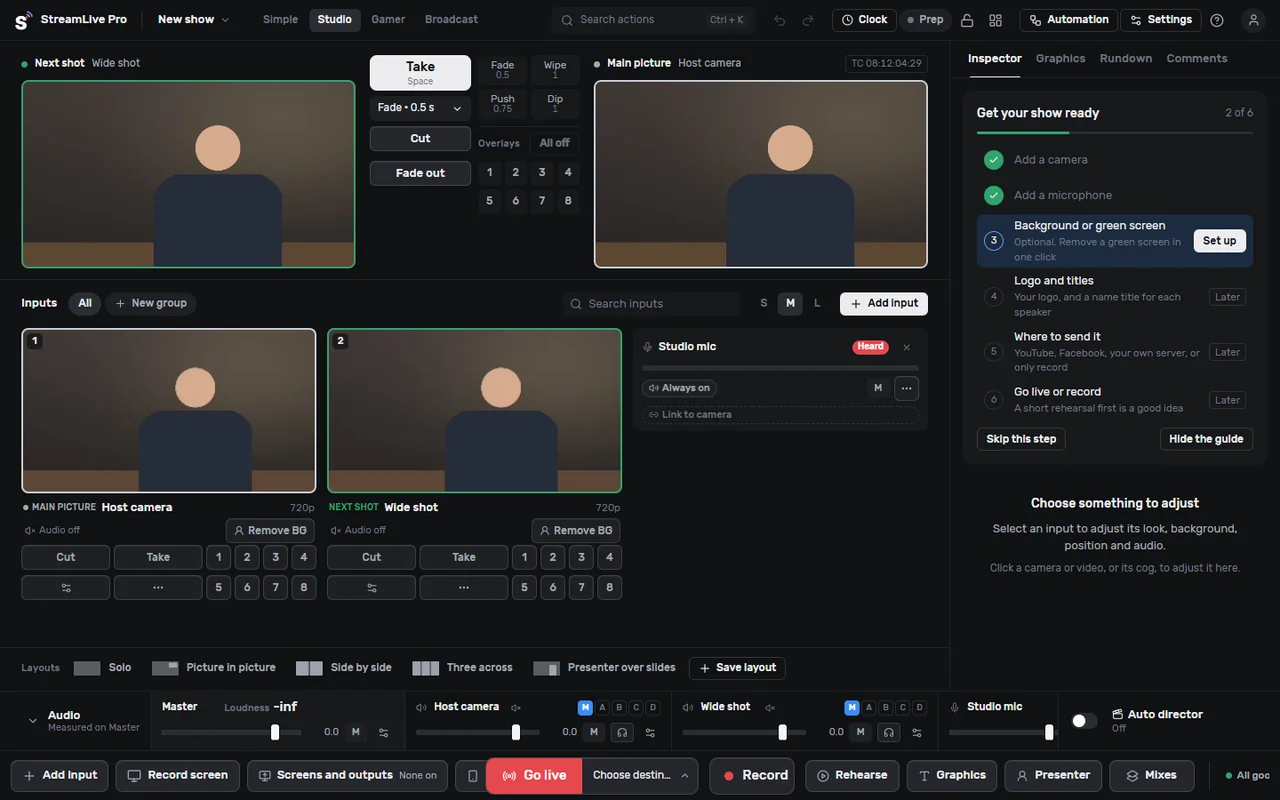
Not in 0.5.0: remote guests are built but switched off, and live caption translation is planned, not released.
A vMix alternative for Mac
vMix runs only on Windows. StreamLive Pro Studio is built for both Windows and Mac, but it cannot be downloaded yet. Where it stands today:
- macOS 13 or later is required.
- It has been tested on Apple silicon Macs. Intel Macs have not been tested.
- The Mac build of 0.5.0 is still in testing and not released.
On Windows it needs Windows 10 or 11, 64-bit, with a DirectX 12 graphics card. More detail: vMix for Mac and vMix alternative.
| vMix | OBS Studio | StreamLive Pro Studio 0.5.0 | |
|---|---|---|---|
| Available today | Yes | Yes | No, coming soon |
| Windows | Yes | Yes | Yes |
| Mac | No | Yes | In testing; Apple silicon only tested |
| Price | Paid licences (see vmix.com/purchase) | Free, open source | Free with a free account; cloud features need a paid plan |
| Send to many networks | Not checked for this page | One service, or plugins that upload per destination | One stream to our cloud, fan-out on our servers |
vMix is the better choice if you need a proven Windows switcher today. OBS is the better choice if you want free software on a Mac today and are comfortable building scenes yourself. Comparisons in depth: StreamLive Pro Studio vs vMix and StreamLive Pro vs OBS.
What to do today: PTZ cameras with OBS or vMix into StreamLive Pro
You can stream PTZ cameras to many networks now, with the switcher you already have:
- Control the PTZ cameras the way you do today (the camera's own controller, its web page, or your switcher's PTZ support).
- Bring the pictures into OBS or vMix and build your program there.
- In StreamLive Pro, get your RTMP, RTMPS or SRT address and key.
- In OBS or vMix, set a custom stream output to that address and key.
- Switch on the destinations in StreamLive Pro and go live. Your encoder uploads one stream; our servers send it to YouTube, Facebook and the rest. See multistream.
Sending from an external encoder needs a paid plan; it is not in the trial. Setup: use OBS or vMix with RTMP, and if you are moving from vMix, coming from vMix. The guide PTZ cameras for live streaming covers choosing cameras, cabling and saved positions.
Who this is for
Halls, synagogues and churches with a fixed PTZ camera or two and one volunteer at the desk (houses of worship); lecture rooms; small studios that want a switcher on a Mac.
Pricing
The desktop app will be free with a free account. Multistreaming and Shorts come with a paid plan: destinations at once by plan 3, 6 or 20, Creator $29 a month. 7-day trial, no credit card. The trial never turns into a paid plan by itself. Status of the app: /desktop. Plans: pricing.
No credit card. The trial never turns into a paid plan by itself.
Start a 7-day trialFrequently asked questions
Can I download StreamLive Pro Studio now?
Not yet. Version 0.5.0 is in testing and waiting for signed installers, and the Mac build is still being tested. The current status is on the /desktop page.
Which PTZ cameras can it control?
Cameras that work with VISCA over IP, Panasonic or ONVIF. We tested a Panasonic AW-HE40 and VISCA studio cameras. Other models have not been tested.
Is there a vMix alternative for Mac?
StreamLive Pro Studio is built for Mac too, but the Mac build is still in testing, needs macOS 13 or later, and has only been tested on Apple silicon. Today, OBS is the free option that runs on a Mac.
How do I stream PTZ cameras to several networks today?
Build your program in OBS or vMix and send it to your StreamLive Pro RTMP or SRT address and key. We deliver it to every network. This needs a paid plan.
What will the desktop app cost?
It will be free with a free account. Multistreaming and Shorts come with a paid plan.