 StreamLive Pro
Private video calls you can record, without going live
Hold a private video call in StreamLive Pro and record it without going live: invite by link, control participants, share a screen and save the recording to Storage.
Video calls in StreamLive Pro are private rooms for a lesson, a meeting or a pre-interview. You create a call, send the invite link, and talk. Nothing is broadcast unless you press Go Live yourself. Press Record and the call is saved as a video file in your Storage, so someone who missed it can watch later.
Before you start
- Participants and length depend on the plan. The number of people in a call is set by the plan. On Creator a single call also has a time limit; on Pro and Studio it does not. See /pricing?lang=en.
- Participants need a recent browser with a camera and microphone. No account and nothing to install. Headphones prevent echo.
- Consent. Before the first recording you are asked to confirm that participants agreed to be recorded. Tell them at the start of the call.
- On the trial recordings carry a small "Made with StreamLive Pro" mark: My Short has a "Made with StreamLive Pro" watermark.
Steps
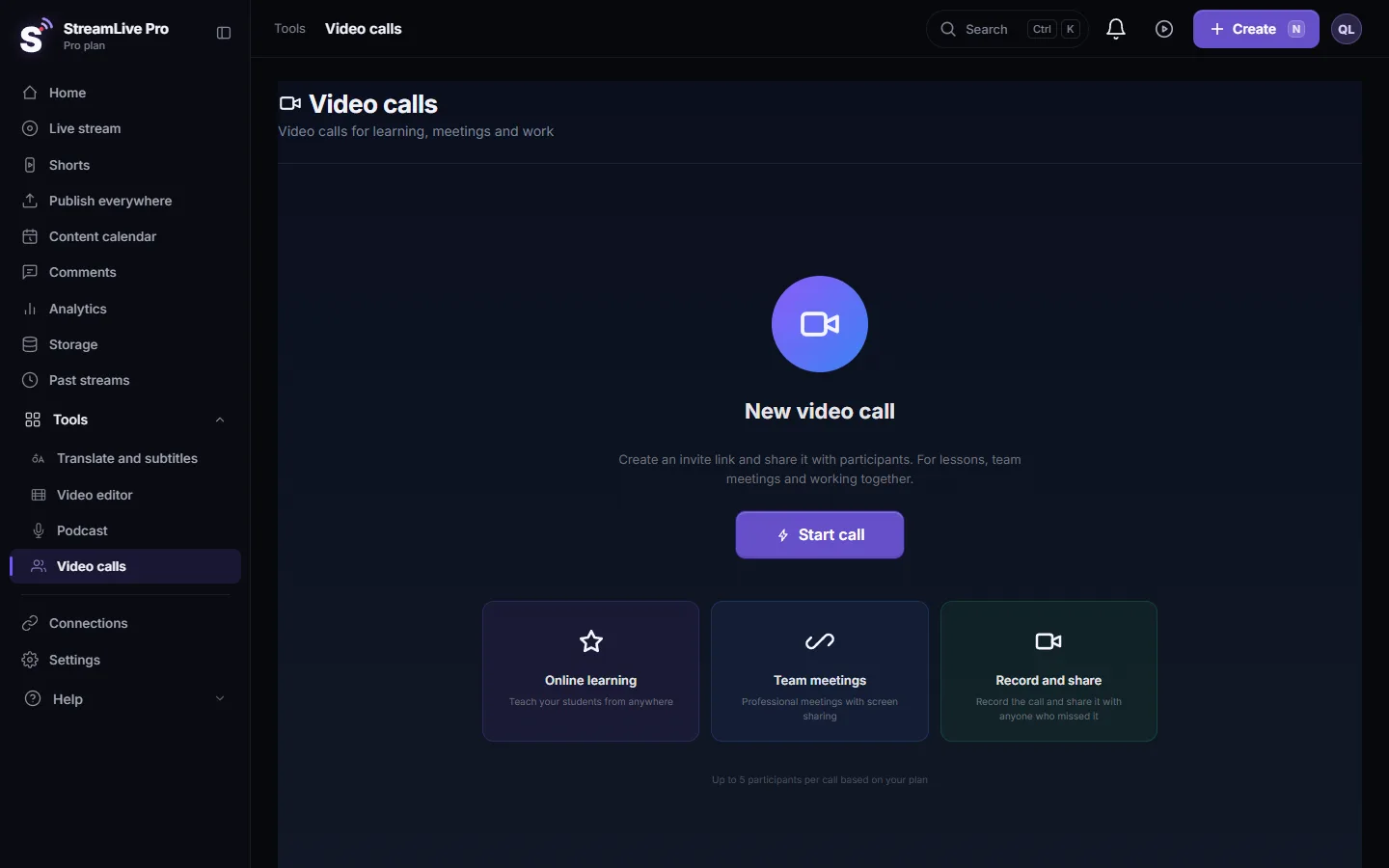
- Open Video calls. Choose Video calls in the menu. The page explains the call: invite link, participants, record and share.
- Click New video call, then Start call. Allow the camera and microphone when the browser asks.
- Send the invite link. Copy it and send it in the chat you already use. Every participant uses the same link.
- Manage participants. Open Chat and People. You appear as the host; each participant has Mute, Camera, Permissions and Remove.
- Set up your own picture and sound. Camera and Mic Settings to pick devices, Noise Suppression for a noisy room, Virtual Background to hide the room behind you.
- Share a screen when you need to. Share Screen shows a slide, a document or a browser tab to everyone.
- Press Record. Confirm consent the first time. The recording is a 1280 x 720 picture of the call with everyone's sound, and REC shows while it runs.
- Stop Rec and end the call. The file is saved to Storage. From there you can download it or turn it into Shorts.
Video call, podcast studio or live studio
| You want | Use |
|---|---|
| A private meeting or lesson, maybe recorded | Video calls |
| A produced conversation: several cameras, camera switching, titles, a file per camera | Podcast: A tour of the podcast studio in your browser |
| An interview broadcast to YouTube, Facebook and more | The browser studio: How to do a live interview with a remote guest |
A video call can also go live: Go Live sends the call to your channels. Leave it alone and the call stays private.
Tips for a smooth call
- Send the link before the call, with a line asking people to open it in Chrome or Edge and to use headphones.
- Mute people who are not speaking in a lesson or a large meeting; the room stays quiet and the recording is cleaner.
- Start Record after everyone has joined and you have said that the call is recorded. The consent step reminds you the first time.
- Use Share Screen for slides rather than holding a document up to the camera.
- For a recorded talk with produced cameras, switch to the podcast studio instead.
What the recording includes
- The call as everyone saw it, at 1280 x 720, with the sound of all participants mixed.
- It is uploaded in pieces while you record, so if the browser closes, what was already sent is kept. An interrupted recording is restored in the background.
- One file for the whole call. Participants are not recorded separately.
What can go wrong
| Problem | Fix |
|---|---|
| A participant cannot join because the call is full | The plan's participant limit is reached. Remove someone, or see /pricing?lang=en |
| A participant sees Access blocked | They click the lock in the address bar, allow camera and microphone, and reload |
| There is an echo | Someone is without headphones, or two devices are in one room. See Echo during a live stream with guests |
| The recording froze | Keep the call tab visible while recording; a hidden tab stops the picture |
| You cannot find the recording | Look in Storage after you press Stop Rec. See Where is my live stream recording? |
Frequently asked questions
Is a video call broadcast to my channels?
No. A video call is private unless you press Go Live. Without it, only the people with the link see and hear the call.
Can I record a video call?
Yes. Press Record, confirm that participants agreed, and the call is saved as a video file in Storage when you stop.
Do participants need an account?
No. They open the invite link in a browser and allow the camera and microphone.
Is each participant recorded to a separate file?
No. The recording is one file of the whole call with everyone's sound.
How many people can join a video call?
It depends on the plan. The pricing page lists the number of participants in a call for each plan.
Keep reading
Echo cancellation removes your speakers from your microphone; noise suppression removes background sound. What each does, its limits, and the StreamLive Pro settings.
What is mix-minus? Echo-free sound for remote guestsWhat is mix-minus: a sound feed for each remote guest with everyone except their own voice. Why it prevents echo, how it works, and how StreamLive Pro builds it.
I cannot hear my guest in the live streamCan't hear a guest in your live? Usually the guest arrived muted, joined without a microphone, or picked the wrong mic. The checks for host and guest, in order.
Echo during a live stream with guestsEcho in a live with guests usually comes from someone using speakers instead of headphones, or watching the live in another tab. How to find who and fix it.
Want to try it? 7-day trial, no credit card.
Start free