 StreamLive Pro
Auto captions, and subtitle translation into 143 languages
Upload a video and get captions timed word by word, to burn in or download as SRT and VTT. Then translate them, English to Hebrew included. Captions during a live broadcast are not available yet.
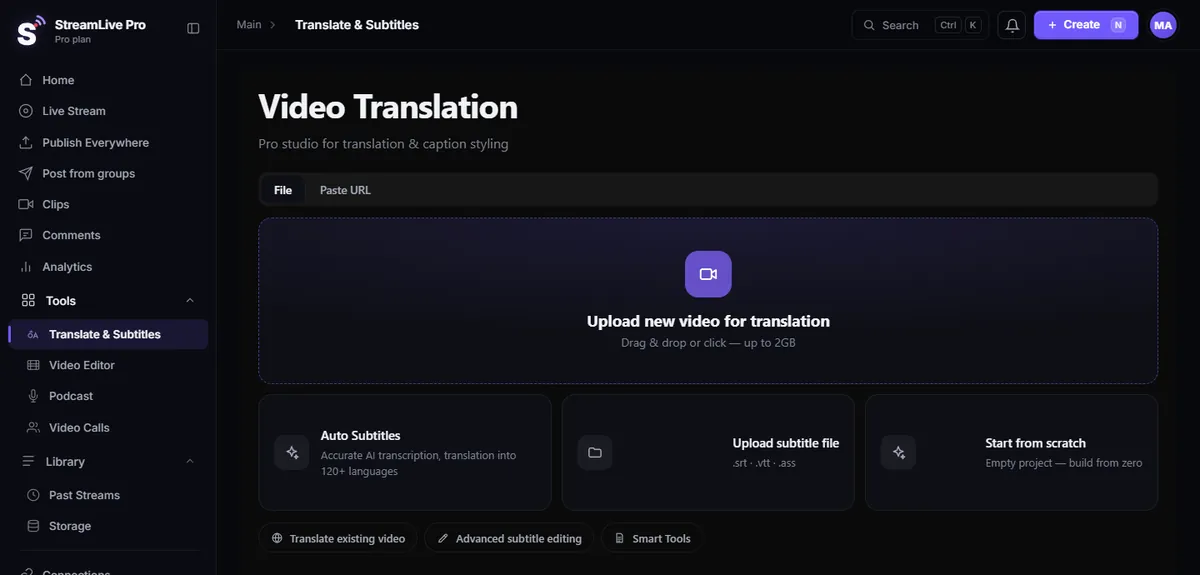
Upload a video, and StreamLive Pro writes its captions: every word with its own timestamp, in the language spoken, ready to burn into the picture or download as a subtitle file. You can then translate those captions into 143 languages.
What you get
- A transcript with a timestamp for every word. Not just a line every few seconds. That is what makes the highlighted-word animation possible, and it lets you fix one word without retiming a whole line.
- More than 80 caption designs. Fonts, colours, positions and the word-by-word highlight, to burn into the video.
- Subtitle files. Export as SRT or VTT for YouTube, Facebook, Vimeo, a website player or a video editor. The editor also exports ASS.
- Captions on Shorts. Every automatic Short gets captions in the same system; see AI Shorts.
How to add auto captions, step by step
- Open Video Translation and upload the video.
- Choose Auto Subtitles. The speech is transcribed.
- Read the transcript and fix what needs fixing: names, technical terms, words in another language.
- Choose a design, or skip this if you only want a file.
- Burn the captions into the video, or export SRT or VTT.
The help articles automatic Hebrew subtitles and caption templates and styles show each screen.
Hebrew captions that read correctly
Hebrew is written right to left, but numbers, English words and some punctuation inside a Hebrew sentence run the other way. It is easy to get wrong: the full stop lands on the wrong side, a phone number flips, or the line scrambles when each word is animated on its own. StreamLive Pro handles Hebrew right-to-left properly: punctuation and numbers land on the correct side, including with the highlighted-word animation. StreamLive Pro is an Israeli service with a fully Hebrew interface.
Burn in or export a file: which to choose
| You want | Choose | Why |
|---|---|---|
| Captions that always show, on Shorts, Reels or TikTok | Burn in | Some viewers there watch without sound, and a burned-in design shows on every device |
| Viewers to switch captions on or off, or pick a language | Export SRT or VTT | YouTube and most website players load a subtitle file as a separate track |
| Captions in several languages on one YouTube video | Export one SRT per language | Each file becomes a language option |
| To keep editing in your own video editor | Export SRT, or ASS from our editor | The editor imports the file and you keep control of the look |
You can do both from the same transcript: burn a styled version for social networks and export a plain file for YouTube.
Translate video subtitles with AI
Once a video has captions, you can translate them. Translation works on whole sentences, not word by word, so the result follows the meaning of the sentence rather than the order of the original words. You can translate into 143 languages.
For example:
- English video into Hebrew. A lecture, an interview or a course in English, with Hebrew subtitles for an Israeli audience. Upload the English video, transcribe in English, translate to Hebrew, and export or burn in. Hebrew is one of the target languages and gets the same right-to-left handling.
- Hebrew video into English (or Spanish, French, Russian, Arabic) for an audience abroad.
- One video, several subtitle files. Export a separate SRT for each language and upload them all to YouTube, where viewers choose.
Translation is metered in minutes of video a month. The long guide translate video captions into other languages goes through the workflow and what to check.
What it does not do
Two things you will not find here:
- No live captions yet. Captions or translation that viewers see during the live broadcast are in development and not available. Everything on this page works on a recording or an uploaded video. See live captions and translation for the status.
- No dubbing. The translated text appears as subtitles. There is no translated voice track and no voice cloning.
Two more limits:
- Automatic transcription makes mistakes, especially with names, rare terms, heavy accents, crosstalk and poor sound. Read the transcript before you publish; fixing a word takes seconds.
- Translation of a phrase that depends on context (a joke, a quote, a term from a specific field) may need a human pass.
Auto captions generator vs subtitle editor
If you only need a subtitle file for one video, many tools can produce one. There are three reasons to do it here: the captions live next to your broadcasts and Shorts, so the same transcript serves the recording, the clips and the translation; Hebrew is handled correctly; and the word timing is kept, so the burned-in design animates word by word. If your work is mostly long-form subtitle editing with frame-accurate cue control for broadcast television, a dedicated subtitle editor will give you more control than we do.
Who uses it
- Lecturers and teachers who publish classes with captions for viewers who watch without sound (lecturers and online courses).
- Podcasts that put captioned clips on social networks.
- Newsrooms that need captions fast on a short video.
- Anyone with an English video who wants Hebrew subtitles, or the reverse.
How many minutes
Translation minutes a month by plan: 120, 500 or 1,500. In the trial you get 10 translation minutes. Creator is $29 a month. 7-day trial, no credit card. The trial never turns into a paid plan by itself. Details: pricing.
No credit card. The trial never turns into a paid plan by itself.
Start a 7-day trialFrequently asked questions
Are there live captions during the broadcast?
Not yet. Captions and translation that viewers see during the live broadcast are in development. Today captions are made on the recording or on an uploaded video.
Can I translate a video from English to Hebrew?
Yes. Transcribe the video in English and translate the captions into Hebrew. The Hebrew captions are laid out correctly right to left, and you can burn them in or export SRT.
Does it dub the video into another language?
No. The translation appears as subtitles only. There is no translated voice track and no voice cloning.
Which subtitle formats can I export?
SRT and VTT, which work with YouTube, website players and video editors. The video editor also exports ASS. You can also burn the captions into the video.
How accurate is the transcription?
Good on clean sound, but it makes mistakes on names, rare terms and people talking over each other. Read the transcript before publishing and fix single words.
How many translation minutes do I get?
It depends on the plan; current numbers are on the pricing page. The 7-day trial includes 10 translation minutes.