 StreamLive Pro
Your first week: the four steps on Home
What the "Your first week" card on Home is, what each of its four steps does, how a step gets ticked, and how to hide it.
A new account sees a card called Your first week at the top of Home. It has four short steps that take you from an empty account to a first real result: something published, and numbers that show how it did.
The four steps
- Connect one network. YouTube or Facebook, one tap each. More networks are one link away.
- Your first result. Upload one video and get edited Shorts with captions, or go live straight from the browser. You choose.
- Post it. Pick a Short and send it to your connected networks in one tap.
- See what worked. Open Analytics: views, comments and followers from every network in one place.
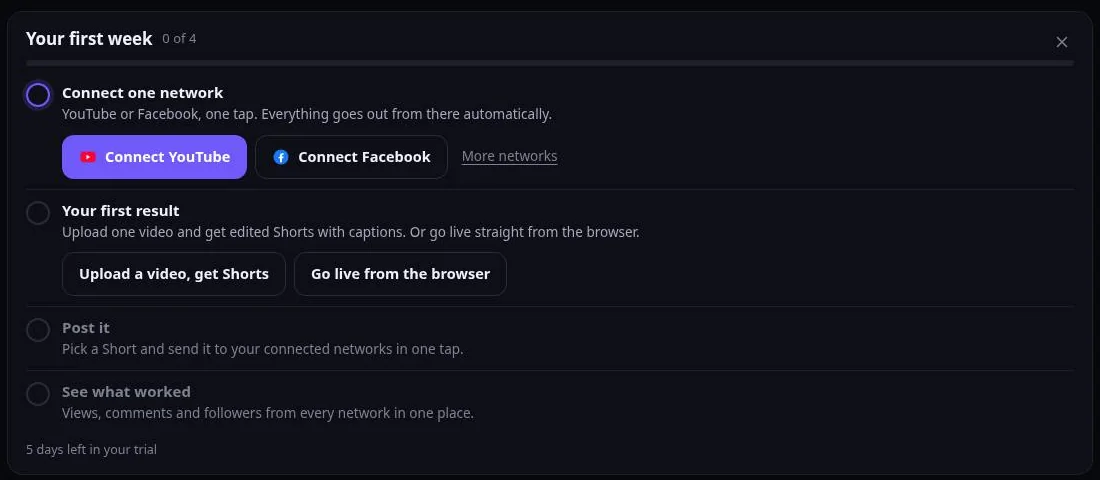
The bar at the top fills as you go, and the card shows how many days are left in your trial.
How a step gets ticked
Each step is ticked by what really happened in your account, not by a click on the card. A network counts once it is connected and working. "Post it" counts once a post went out. "See what worked" counts the first time you open Analytics.
Hiding it
Press X on the card to hide it. A quiet link at the end of Home brings it back. The card also goes away by itself when all four steps are done, or when the trial period it is meant for is over.
Good to know
- The card is only for new trial accounts. Long-time accounts never see it.
- It sends nothing. There are no e-mails or messages from this card: everything is on screen.
- "Upload a video, get Shorts" opens the file picker in the same tap, and the Shorts window right after it.
Frequently asked questions
I hid the card. How do I get it back?
Scroll to the end of Home and use the link that shows the first-week list again.
I connected YouTube but the step is not ticked.
The step is ticked only when the connection works. If the channel shows "Reconnect" under Connections, reconnect it and the tick follows.
Do I have to do the steps in order?
No. Do any of them in any order; each one is ticked on its own.
Keep reading
From sign-up to live on YouTube or Facebook: five steps in the browser, nothing to install, and the one wait you should know about.
Plans, billing and limitsWhich plans exist, what exactly each limit applies to, what happens when you reach one, and how the subscription, invoices and cancellation work.
StreamLive Pro: frequently asked questionsShort, exact answers to what people ask before they sign up: what it does, which networks, prices, the trial, the app, OBS and Hebrew.
The trial watermark and TikTokDuring the free trial, everything the system makes for you (Shorts, exports, translations) carries a small "Made with StreamLive Pro" mark. TikTok does not let apps post videos with such a mark, so those Shorts cannot be sent there. Once you choose a plan the mark is gone.
Want to try it? 7-day trial, no credit card.
Start free