 StreamLive Pro
Remote guests in StreamLive Pro Studio (desktop app)
How remote guests work in the StreamLive Pro Studio desktop app: a link per guest, a waiting room with a device check, Admit in one click. Status: built, switched off in 0.5.0.
Status: remote guests are built into StreamLive Pro Studio 0.5.0, but they are switched off in that version. They will be switched on after testing with real guests outside the studio's own network. Until then, the web studio already takes remote guests, and in the desktop app a phone or another computer can join as a network camera (NDI or SRT).
How it works
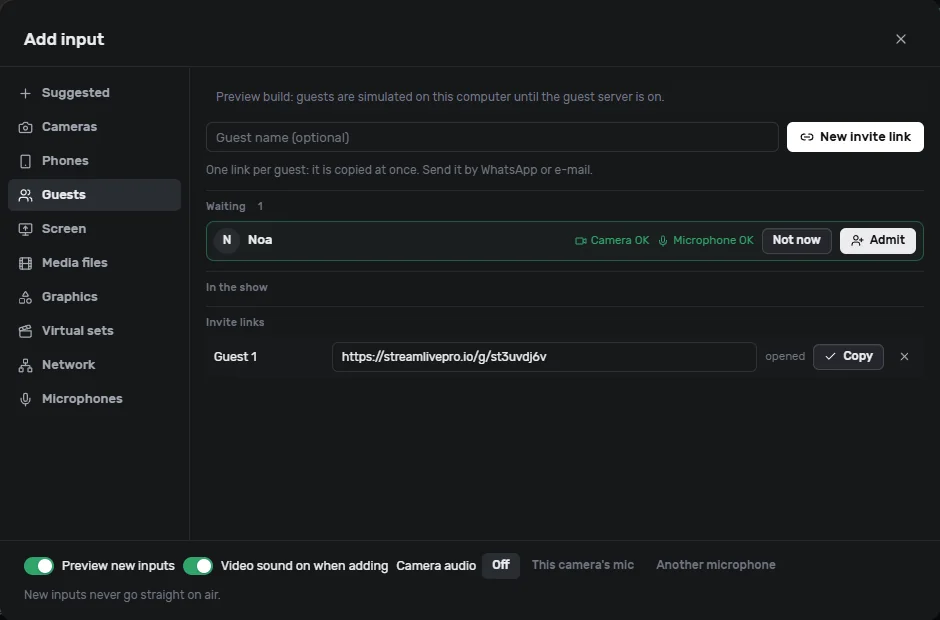
- In the desktop app: Add input > Guests > New invite link. Each guest gets their own link (streamlivepro.io/g/...), copied at once. Send it by WhatsApp or e-mail.
- The guest opens the link on a phone or a computer. No app and no account. They see themselves, check the camera and microphone, write their name and press Join.
- In the app the guest appears under Waiting, with Camera OK and Microphone OK. A notice also pops up wherever you are in the app.
- Admit puts the guest into the show as an input, in one click. Not now sends them back to wait; Remove takes them out.
Picture, sound and privacy
The guest's picture and sound go straight from their browser to your studio. Our server only passes the short messages that set up the connection. When a direct path is not possible (some company or mobile networks), a relay is used for that guest.
The guest page says that their picture and sound go only to the studio that invited them.
Links
- One link per guest. A link can be cancelled at any time, with Undo for a few seconds.
- Links last 30 days.
Frequently asked questions
Does the guest need to install anything?
No. The link opens in a normal browser on a phone or a computer.
Can I use remote guests in version 0.5.0?
Not yet: they are switched off in 0.5.0. Use the web studio for guests today, or add a phone as a network camera.
Does the guest need a StreamLive Pro account?
No. Only the host needs an account.
Keep reading
How to open the podcast studio, invite guests with a single link and nothing to install, control what is seen and heard, and record the conversation to a file.
Guests and invitations — bringing people into the roomHow to send an invite link, what a guest sees before joining, and what to do when a guest cannot be seen or heard.
Echo cancellation and noise suppression explainedEcho cancellation removes your speakers from your microphone; noise suppression removes background sound. What each does, its limits, and the StreamLive Pro settings.
What is LUFS? Loudness for video and podcastsWhat LUFS means: a unit for how loud audio sounds to people, not its peaks. Common targets, true peak, and the levels StreamLive Pro sets for Shorts and podcasts.
Want to try it? 7-day trial, no credit card.
Start free